
Toyota 4Runner: Components
COMPONENTS
ILLUSTRATION
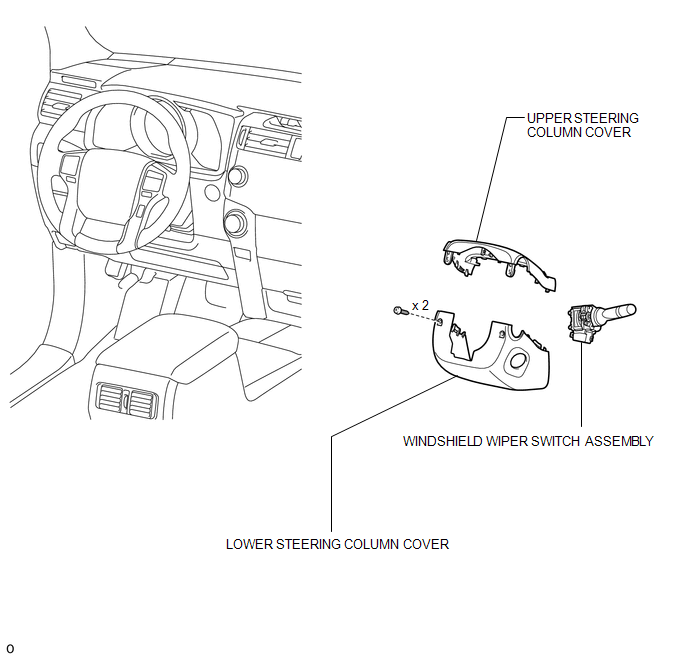
 Wiper Switch
...
 Removal
REMOVAL
PROCEDURE
1. DISCONNECT CABLE FROM NEGATIVE BATTERY TERMINAL
NOTICE:
When disconnecting the cable, some systems need to be initialized after the cable
is reconnected (See page ).
2. RE ...
Other materials about Toyota 4Runner:
Ptc Heater Assembly
Components
COMPONENTS
ILLUSTRATION
Removal
REMOVAL
PROCEDURE
1. REMOVE AIR CONDITIONING UNIT
(a) Remove the air conditioning unit (See page
).
2. REMOVE QUICK HEATER ASSEMBLY
(a) Detach the 2 clamps.
...
Adjustment
ADJUSTMENT
CAUTION / NOTICE / HINT
NOTICE:
If the wheel alignment has been adjusted, and if suspension or underbody components
have been removed/installed or replaced, be sure to perform the following initialization
procedure in order for the system to ...
© 2016-2026 | www.to4runner.net

0.0107
0.0107