
Toyota 4Runner: General Information
GENERAL INFORMATION
- A large number of ECU controlled systems are used in the 4RUNNER. In general, ECU controlled systems are considered to be very intricate, requiring a high level of technical knowledge to troubleshoot. However, most problem checking procedures only involve inspecting the ECU controlled system's circuits one by one. An adequate understanding of the system and a basic knowledge of electricity is enough to perform effective troubleshooting, accurate diagnoses and necessary repairs.
1. TROUBLESHOOTING PROCEDURES
- The troubleshooting procedures consist of diagnosis procedures for when
a DTC is stored and diagnosis procedures for when no DTC is stored. The
basic idea is explained in the following table.
Procedure Type
Details
Troubleshooting Method
DTC Based Diagnosis
The diagnosis procedure is based on the DTC that is stored.
The malfunctioning part is identified based on the DTC detection conditions using a process of elimination.
The possible trouble areas are eliminated one-by-one by use of the Techstream and inspection of related parts.
Symptom Based Diagnosis
(No DTCs stored)
The diagnosis procedure is based on problem symptoms.
The malfunctioning part is identified based on the problem symptoms using a process of elimination.
The possible trouble areas are eliminated one-by-one by use of the Techstream and inspection of related parts.
- Vehicle systems are complex and use many ECUs that are difficult to inspect independently. Therefore, a process of elimination is used, where components that can be inspected individually are inspected, and if no problems are found in these components, the related ECU is identified as the problem and replaced.
- It is extremely important to ask the customer about the environment and the conditions present when the problem occurred (Customer Problem Analysis). This makes it possible to simulate the conditions and confirm the symptom. If the symptom cannot be confirmed or the DTC does not recur, the malfunctioning part may not be identified using the troubleshooting procedure, and the ECU for the related system may be replaced even though it is not defective. If this happens, the original problem will not be solved.
- In order to prevent endless expansion of troubleshooting procedures, the troubleshooting procedures are written with the assumption that multiple malfunctions do not occur simultaneously for a single problem symptom.
- To identify the malfunctioning part, troubleshooting procedures narrow down the target by separating components, ECUs and wire harnesses during the inspection. If the wire harness is identified as the cause of the problem, it is necessary to inspect not only the connections to components and ECUs but also all of the wire harness connectors between the component and the ECU.
2. DESCRIPTION
System data and the Diagnostic Trouble Codes (DTCs) can be read from the Data Link Connector 3 (DLC3) of the vehicle. When the system seems to be malfunctioning, use the Techstream to check for a malfunction and perform repairs.
3. DATA LINK CONNECTOR 3 (DLC3)
(a) The vehicle ECU uses the ISO 15765-4 communication protocol. The terminal arrangement of the DLC3 complies with SAE J1962 and matches the ISO 15765-4 format.
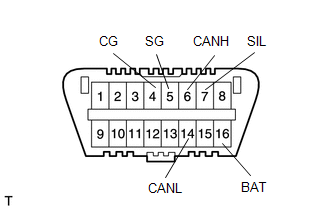
|
Terminal No. (Symbol) |
Terminal Description |
Condition |
Specified Condition |
|---|---|---|---|
|
7 (SIL) - 5 (SG) |
Bus "+" line |
During transmission |
Pulse generation |
|
4 (CG) - Body ground |
Chassis ground |
Always |
Below 1 Ω |
|
5 (SG) - Body ground |
Signal ground |
Always |
Below 1 Ω |
|
16 (BAT) - Body ground |
Battery positive |
Always |
11 to 14 V |
|
6 (CANH) - 14 (CANL) |
CAN bus line |
Ignition switch off* |
54 to 69 Ω |
|
6 (CANH) - 4 (CG) |
HIGH-level CAN bus line |
Ignition switch off* |
200 Ω or higher |
|
14 (CANL) - 4 (CG) |
LOW-level CAN bus line |
Ignition switch off* |
200 Ω or higher |
|
6 (CANH) - 16 (BAT) |
HIGH-level CAN bus line |
Ignition switch off* |
6 kΩ or higher |
|
14 (CANL) - 16 (BAT) |
LOW-level CAN bus line |
Ignition switch off* |
6 kΩ or higher |
NOTICE:
*: Before measuring the resistance, leave the vehicle as is for at least 1 minute and do not operate the ignition switch, any other switches, or the doors.
If the result is not as specified, the DLC3 may have a malfunction. Repair or replace the harness and connector.
(b) Connect the cable of the Techstream to the DLC3, turn the ignition switch on and attempt to use the tester. If the display indicates that a communication error has occurred, there is a problem either with the vehicle or with the tester.
HINT:
- If communication is normal when the tester is connected to another vehicle, inspect the DLC3 of the original vehicle.
- If communication is still not possible when the tester is connected to another vehicle, the problem may be in the tester itself. Consult the Service Department listed in the tester's instruction manual.
- Before using the Techstream, read the tester operator's manual thoroughly.
- If the tester cannot communicate with the ECU controlled systems when
connected to the DLC3 with the ignition switch in the on position and the
tester turned on, there is a problem on the vehicle side or tester side.
- If communication is possible when the tester is connected to another vehicle, inspect the diagnosis data link line (bus (+) line), CANH and CANL lines, and the power circuits for the vehicle ECUs.
- If communication is still not possible when the tester is connected to another vehicle, the problem is probably in the tester itself. Perform the Self Test procedure outlined in the tester operator's manual.

 How To Proceed With Troubleshooting
HOW TO PROCEED WITH TROUBLESHOOTING
1. OPERATION FLOW
HINT:
Perform troubleshooting in accordance with the procedures below. The following
is an outline of basic troubleshooting procedures. Confi ...
Other materials about Toyota 4Runner:
Switching the display
Items displayed can be switched by pressing the display change button.
Odometer
Displays the total distance the vehicle has been driven.
Trip meter
Displays the distance the vehicle has been driven since the meter was last
reset. Trip meters “A” ...
Sound Signal Circuit between Navigation Receiver Assembly and Stereo Jack Adapter
DESCRIPTION
The No. 1 stereo jack adapter assembly sends the sound signal from an external
device to the navigation receiver assembly via this circuit.
The sound signal that has been sent is amplified by the stereo component amplifier
assembly, and then ...

0.008