
Toyota 4Runner: Removal
REMOVAL
PROCEDURE
1. DISCONNECT CABLE FROM NEGATIVE BATTERY TERMINAL
CAUTION:
Wait at least 90 seconds after disconnecting the cable from the negative (-) battery terminal to disable the SRS system.
NOTICE:
When disconnecting the cable, some systems need to be initialized after the cable
is reconnected (See page .gif) ).
).
2. REMOVE INSTRUMENT PANEL SUB-ASSEMBLY
(a) Remove the instrument panel sub-assembly (See page
).
3. REMOVE NO. 1 HEATER TO REGISTER DUCT
4. REMOVE NO. 2 HEATER TO REGISTER DUCT
5. REMOVE NO. 1 SIDE DEFROSTER NOZZLE DUCT
6. REMOVE NO. 2 SIDE DEFROSTER NOZZLE DUCT
7. REMOVE NO. 3 HEATER TO REGISTER DUCT
8. REMOVE DEFROSTER NOZZLE ASSEMBLY
9. REMOVE NAVIGATION ANTENNA ASSEMBLY
|
(a) Detach the clamp. |
|
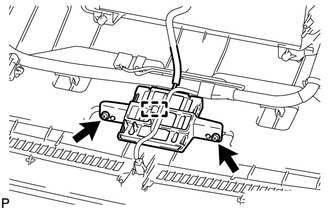
(b) Remove the 2 screws and antenna.
 Components
COMPONENTS
ILLUSTRATION
...
 Inspection
INSPECTION
PROCEDURE
1. INSPECT NAVIGATION ANTENNA ASSEMBLY
(a) Measure the resistance according to the value(s) in the table below.
Standard Resistance:
Tester C ...
Other materials about Toyota 4Runner:
Power Window Motor Malfunction (B2311)
DESCRIPTION
The power window regulator motor is operated by the multiplex network master
switch or power window regulator switch. The power window regulator motor assembly
has motor and ECU functions.
This DTC is stored when the power window regulator mo ...
Disassembly
DISASSEMBLY
PROCEDURE
1. REMOVE BLOWER ASSEMBLY
(a) Remove the bolt.
(b) Detach the 2 claws and remove the blower unit assembly.
2. REMOVE DEFROSTER NOZZLE ASSEMBLY
(a) Detach the 6 claws an ...

0.0069