
Toyota 4Runner: Back Door Garnish(for Side)
Components
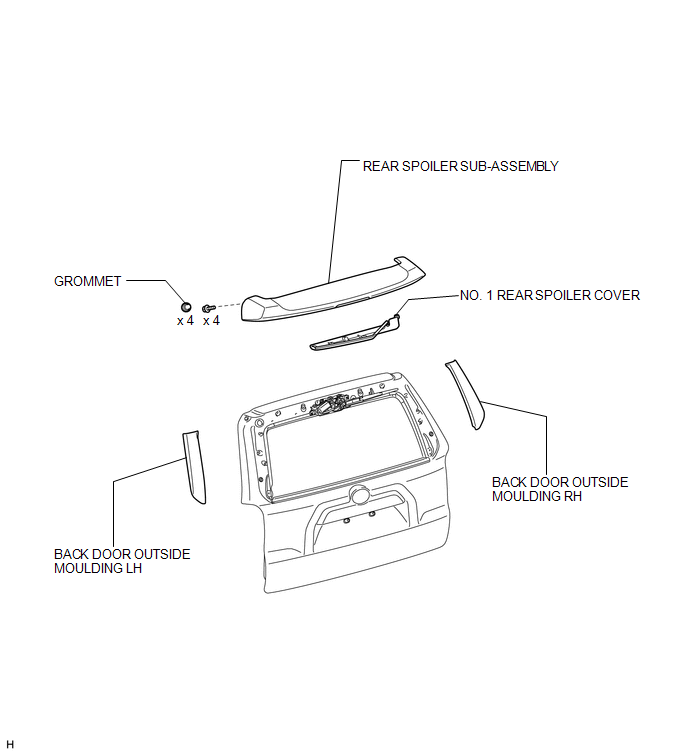
COMPONENTS
ILLUSTRATION
Installation
INSTALLATION
PROCEDURE
1. INSTALL BACK DOOR OUTSIDE MOULDING LH
(a) Attach the 5 clips to install the back door outside moulding.
2. INSTALL BACK DOOR OUTSIDE MOULDING RH
HINT:
Use the same procedure described for the LH side.
3. INSTALL REAR SPOILER SUB-ASSEMBLY
.gif)
4. INSTALL NO. 1 REAR SPOILER COVER
Removal
REMOVAL
PROCEDURE
1. REMOVE NO. 1 REAR SPOILER COVER
.gif)
2. REMOVE REAR SPOILER SUB-ASSEMBLY
3. REMOVE BACK DOOR OUTSIDE MOULDING LH
NOTICE:
- Do not remove the clips.
- If the clips are damaged or fall off, replace them with new clips.
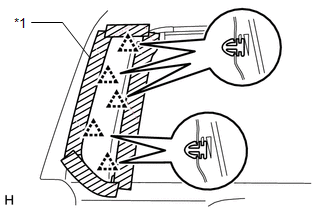
(a) Put protective tape around the back door outside moulding.
(b) Detach the 5 clips and remove the back door outside moulding.
Text in Illustration|
*1 |
Protective Tape |
4. REMOVE BACK DOOR OUTSIDE MOULDING RH
HINT:
Use the same procedure described for the LH side.
 Installation
INSTALLATION
PROCEDURE
1. INSTALL OUTER BACK DOOR GLASS WEATHERSTRIP ASSEMBLY
(a) Attach the 8 claws to install the outer back door glass weatherstrip.
2. INSTALL BACK DOOR GLASS
3. INSTALL BA ...

Other materials about Toyota 4Runner:
Communication Malfunction (Bus Ic) (B1497)
DESCRIPTION
The air conditioning harness assembly connects the No. 1 air conditioning amplifier
assembly and each servo motor. The No. 1 air conditioning amplifier assembly supplies
power and sends operation instructions to each servo motor through the No ...
XM Tuner Malfunction (B15BA)
DESCRIPTION
These DTCs are stored when a malfunction occurs in the stereo component tuner
assembly.
DTC Code
DTC Detection Condition
Trouble Area
B15BA
When either of the conditions below is met: ...

0.0068