
Toyota 4Runner: Components
COMPONENTS
ILLUSTRATION
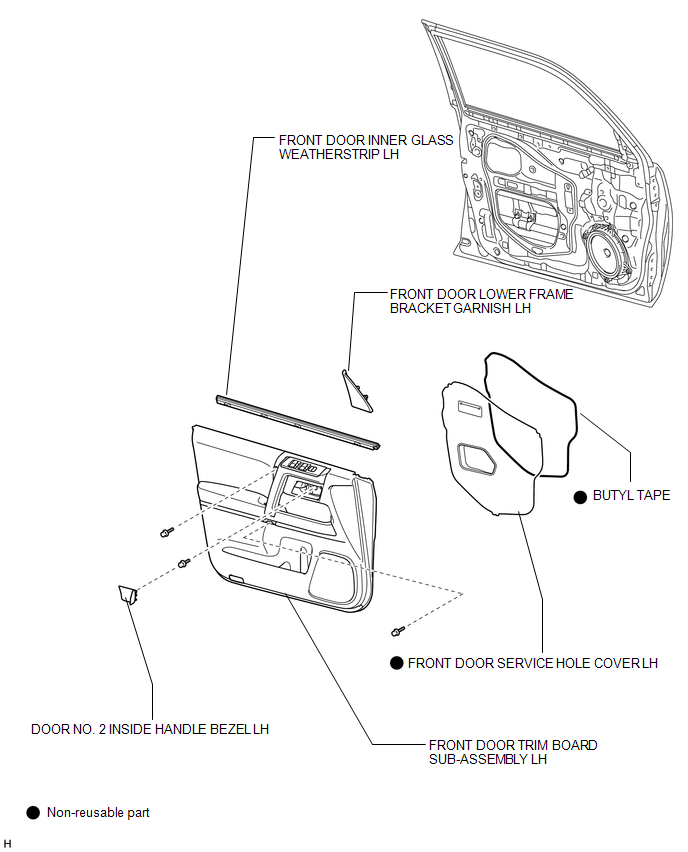
ILLUSTRATION
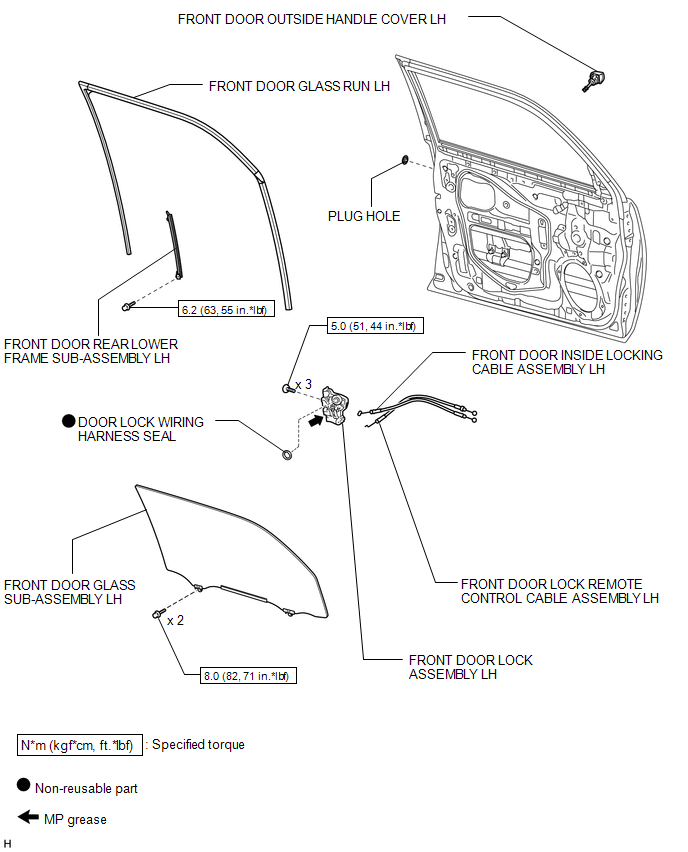
 Front Door Lock
...
 Removal
REMOVAL
CAUTION / NOTICE / HINT
HINT:
Use the same procedure for the RH and LH sides.
The procedure listed below is for the LH side.
PROCEDURE
1. DISCONNECT CABLE FROM NEGATIVE ...
Other materials about Toyota 4Runner:
Playing MP3 and WMA discs
Type A
Type B and C
Loading and ejecting MP3 and WMA discs
Selecting MP3 and WMA discs (type C only)
Selecting and scanning a folder
Selecting folders one at a time
Press “∧” or “∨” on to select
the desired folder.
Scanning the firs ...
Problem Symptoms Table
PROBLEM SYMPTOMS TABLE
HINT:
Use the table below to help determine the cause of problem symptoms.
If multiple suspected areas are listed, the potential causes of the symptoms
are listed in order of probability in the "Suspected Area" ...
© 2016-2026 | www.to4runner.net

0.0074
0.0074