
Toyota 4Runner: Disassembly
DISASSEMBLY
PROCEDURE
1. REMOVE NO. 1 ROOF SILENCER PAD (w/o Sliding Roof)
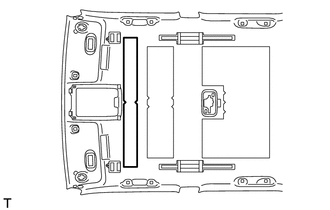
(a) Remove the No. 1 roof silencer pad.
2. REMOVE NO. 2 ROOF SILENCER PAD
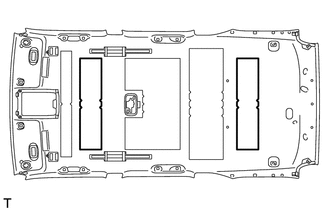
(a) w/o Sliding Roof:
Remove the 2 No. 2 roof silencer pads.
|
(b) w/ Sliding Roof: Remove the No. 2 roof silencer pad. |
|
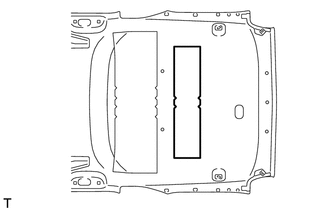
3. REMOVE NO. 3 ROOF SILENCER PAD (w/o Sliding Roof)
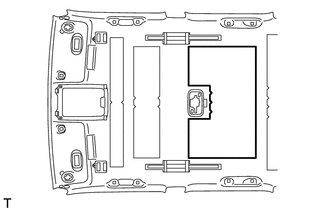
(a) Remove the No. 3 roof silencer pad.
4. REMOVE NO. 4 ROOF SILENCER PAD
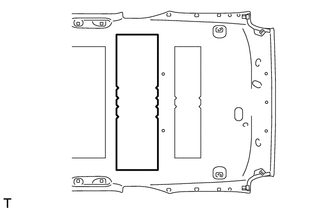
(a) w/o Sliding Roof:
Remove the No. 4 roof silencer pad.
|
(b) w/ Sliding Roof: Remove the No. 4 roof silencer pad. |
|
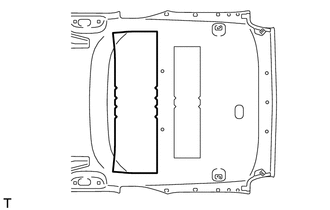
5. REMOVE VANITY LIGHT ASSEMBLY
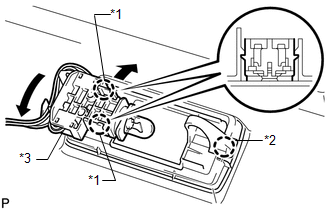
HINT:
Use the same procedure for the other vanity light.
(a) Detach the 2 claws labeled A and separate the bulb holder from the vanity light as shown in the illustration.
(b) Detach the claw labeled B and remove the vanity light.
Text in Illustration|
*1 |
Claw A |
|
*2 |
Claw B |
|
*3 |
Bulb Holder |
6. REMOVE NO. 1 ROOF WIRE
(a) Turn the visor connectors approximately 90° clockwise and remove them from the roof headlining.
(b) Detach each clamp and remove the tape and No. 1 roof wire.
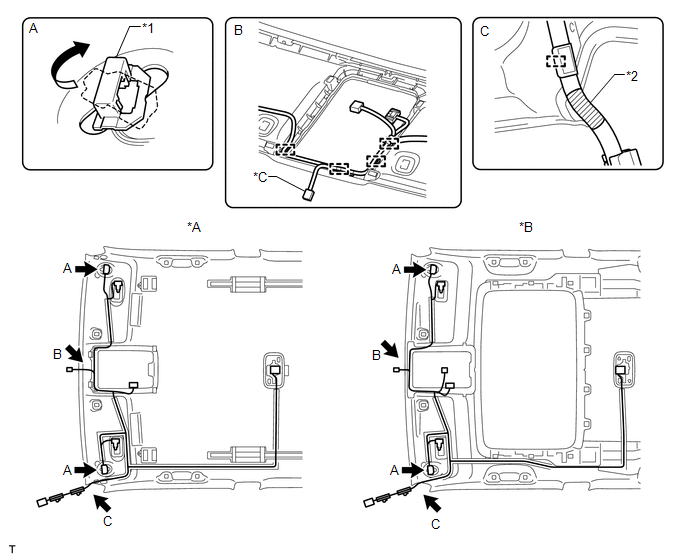 Text in Illustration
|
*A |
w/o Sliding Roof |
*B |
w/ Sliding Roof |
|
*C |
w/ EC Mirror |
- |
- |
|
*1 |
Visor Connector |
*2 |
Marking Tape |
7. REMOVE NO. 2 ANTENNA CORD SUB-ASSEMBLY
(a) w/o Sliding Roof:
Remove the No. 2 antenna cord sub-assembly (See page
.gif) ).
).
(b) w/ Sliding Roof:
Remove the No. 2 antenna cord sub-assembly (See page
).
 Components
COMPONENTS
ILLUSTRATION
ILLUSTRATION
ILLUSTRATION
ILLUSTRATION
ILLUSTRATION
ILLUSTRATION
ILLUSTRATION
ILLUSTRATION
ILLUSTRATION
ILLUSTRATION
ILLUSTRATION
ILLUSTRATION ...
 Reassembly
REASSEMBLY
PROCEDURE
1. INSTALL NO. 2 ANTENNA CORD SUB-ASSEMBLY
(a) w/o Sliding Roof:
Install the No. 2 antenna cord sub-assembly (See page
).
(b) w/ Sliding Roof:
Install the No. 2 antenna co ...
Other materials about Toyota 4Runner:
Headlight Relay Circuit
DESCRIPTION
The main body ECU receives headlight dimmer switch information signals, and illuminates
the low beam headlight.
WIRING DIAGRAM
CAUTION / NOTICE / HINT
NOTICE:
Inspect the fuses and bulbs for circuits related to this system before performin ...
Data List / Active Test
DATA LIST / ACTIVE TEST
1. DATA LIST
NOTICE:
In the table below, the values listed under "Normal Condition" are reference
values. Do not depend solely on these reference values when deciding whether a part
is faulty or not.
HINT:
Using the T ...

0.0074