
Toyota 4Runner: Disassembly
DISASSEMBLY
PROCEDURE
1. REMOVE REAR PROPELLER SHAFT UNIVERSAL JOINT SPIDER BEARING
HINT:
Use the same procedure for all rear propeller shaft universal joint spider bearing.
|
(a) Place matchmarks on the flange yoke and propeller shaft. Text in Illustration
|
|
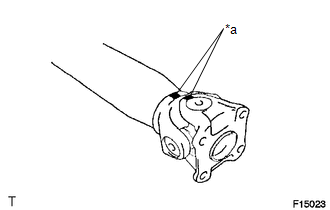
|
(b) Using a brass bar and hammer, slightly tap in the spider bearing outer races. |
|
.png)
(c) Using 2 screwdrivers, remove the 4 snap rings from the grooves.
|
(d) Using SST, remove the spider bearing from the propeller shaft. SST: 09332-25010 HINT: Before installing SST, sufficiently raise the part labeled A. If the part labeled A is too low, it may be difficult to install SST. |
|
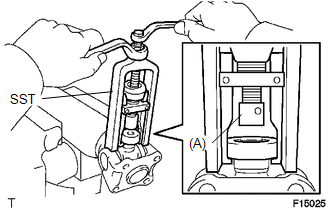
|
(e) Clamp the spider bearing outer race in a vise between aluminum plates and tap off the propeller shaft with a hammer. Text in Illustration
HINT: Remove the spider bearing on the opposite side using the same procedure. NOTICE: Do not tap the shaft. |
|
.png)
|
(f) Install the 2 removed spider bearing outer races to the universal joint spider. |
|
.png)
(g) Using SST, remove the bearing from the yoke.
SST: 09332-25010
HINT:
Before installing SST, sufficiently raise the part labeled A. If the part labeled A is too low, it may be difficult to install SST.
|
(h) Clamp the outer bearing race in a vise between aluminum plates and tap off the yoke with a hammer. Text in Illustration
|
|
.png)
(i) Remove the universal joint spider.
 Components
COMPONENTS
ILLUSTRATION
...
 Removal
REMOVAL
PROCEDURE
1. REMOVE PROPELLER SHAFT ASSEMBLY
(a) Place matchmarks on the propeller shaft flange and differential flange.
Text in Illustration
*a
...
Other materials about Toyota 4Runner:
Short to GND in CAN Bus Line
DESCRIPTION
There may be a short circuit between the CAN bus lines and GND when the resistance
between terminals 6 (CANH) and 4 (CG) or terminals 14 (CANL) and 4 (CG) of the DLC3
is below 200 Ω.
Symptom
Trouble Area
...
Sensor (Motor) Failure (B2341,B2344)
DESCRIPTION
When the sliding roof drive gear sub-assembly detects a motor malfunction
and the sliding roof operation is stopped, DTC B2341 is stored.
When the sliding roof drive gear sub-assembly detects a gear position
malfunctio ...

0.0065