
Toyota 4Runner: Installation
INSTALLATION
PROCEDURE
1. INSTALL NO. 1 ULTRASONIC SENSOR RETAINER
|
(a) Align the keyhole and protrusion as shown in the illustration. Text in Illustration
|
|
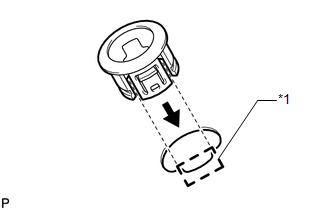
(b) Attach the 4 claws to install the No. 1 ultrasonic sensor retainer to the rear bumper cover.
NOTICE:
Do not damage the bumper cover with the protrusion when installing the No. 1 ultrasonic sensor retainer.
HINT:
Use the same procedure as for the other side.
2. INSTALL NO. 2 ULTRASONIC SENSOR RETAINER
|
(a) Align the keyhole and protrusion as shown in the illustration. Text in Illustration
|
|
.png)
(b) Attach the 3 claws to install the No. 2 ultrasonic sensor retainer to the rear bumper cover.
NOTICE:
Do not damage the bumper cover with the protrusion when installing the No. 2 ultrasonic sensor retainer.
HINT:
Use the same procedure as for the other side.
3. INSTALL ULTRASONIC SENSOR CLIP
(a) Attach the claw to install the ultrasonic sensor clip to the No. 1 ultrasonic sensor.
HINT:
Use the same procedure as for the other side.
4. INSTALL NO. 1 ULTRASONIC SENSOR
(a) Attach the 2 claws to install the No. 1 ultrasonic sensor to the ultrasonic sensor retainer.
HINT:
Use the same procedure as for the other side.
5. INSTALL NO. 3 FLOOR WIRE
.gif)
6. INSTALL REAR BUMPER COVER
7. INSTALL REAR QUARTER PANEL MUDGUARD LH
8. INSTALL REAR QUARTER PANEL MUDGUARD RH
HINT:
Use the same procedure as for the LH side.
9. INSTALL JACK BOX HOLE COVER
 Inspection
INSPECTION
PROCEDURE
1. INSPECT NO. 1 ULTRASONIC SENSOR
(a) Measure the resistance according to the value(s) in the table below.
Standard Resistance:
Tester Connection
Co ...
 Brake (front)
...
Other materials about Toyota 4Runner:
Terminals Of Ecu
TERMINALS OF ECU
1. NAVIGATION RECEIVER ASSEMBLY (for 9 Speakers)
Terminal No. (Symbol)
Wiring Color
Terminal Description
Condition
Specified Condition
G5-2 (RL+) - G6-7 (GND)
...
Disassembly
DISASSEMBLY
PROCEDURE
1. REMOVE RADIATOR GRILLE
2. REMOVE FRONT BUMPER EXTENSION MOUNTING BRACKET (w/ License Plate Bracket)
(a) Remove the 2 screws to remove the front bumper extension mounting
bracket.
...

0.0225