
Toyota 4Runner: Instrument Panel Speaker
Components
COMPONENTS
ILLUSTRATION
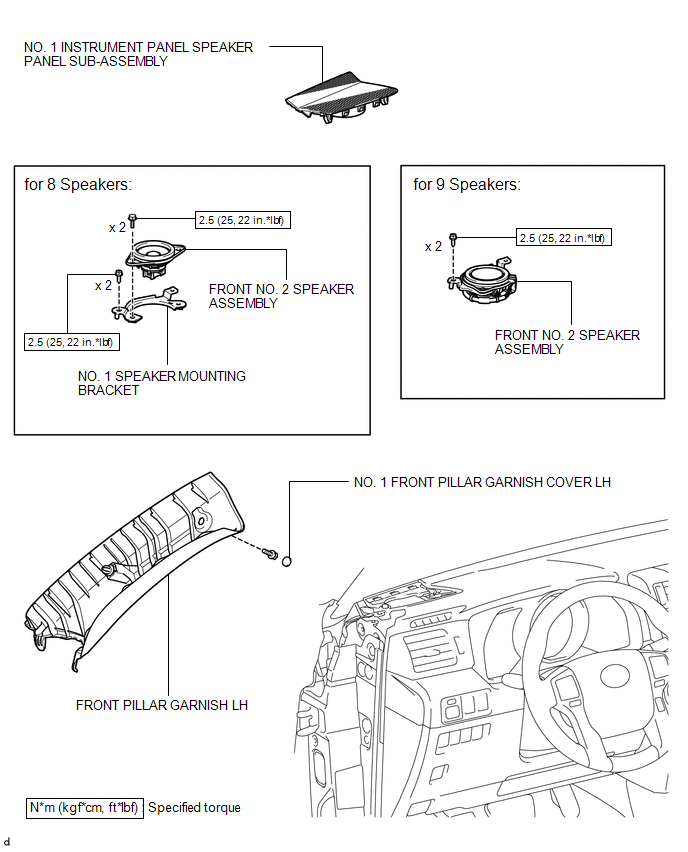
Removal
REMOVAL
CAUTION / NOTICE / HINT
HINT:
- Use the same procedure for both the RH and LH sides.
- The procedure listed below is for the LH side.
PROCEDURE
1. REMOVE FRONT PILLAR GARNISH LH
.gif)
2. REMOVE NO. 1 INSTRUMENT PANEL SPEAKER PANEL SUB-ASSEMBLY
3. REMOVE FRONT NO. 2 SPEAKER ASSEMBLY
(a) Remove the 2 screws.
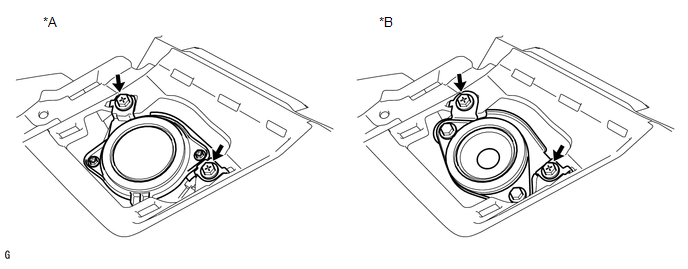 Text in Illustration
|
*A |
for 9 Speakers |
*B |
for 8 Speakers |
(b) Disconnect the connector to remove the front No. 2 speaker assembly.
NOTICE:
Do not touch the cone of the front No. 2 speaker assembly.
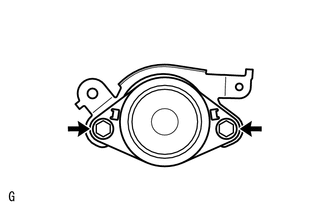
4. REMOVE NO. 1 SPEAKER MOUNTING BRACKET (for 8 Speakers)
|
(a) Remove the 2 bolts and No. 1 speaker mounting bracket. |
|
Inspection
INSPECTION
PROCEDURE
1. INSPECT FRONT NO. 2 SPEAKER ASSEMBLY
(a) Temporarily replace the front No. 2 speaker assembly with a new or normally functioning one.
OK:
Malfunction disappears.
Installation
INSTALLATION
CAUTION / NOTICE / HINT
HINT:
- Use the same procedure for both the RH and LH sides.
- The procedure listed below is for the LH side.
PROCEDURE
1. INSTALL NO. 1 SPEAKER MOUNTING BRACKET (for 8 Speakers)
(a) Install the No. 1 speaker mounting bracket with the 2 bolts.
Torque:
2.5 N·m {25 kgf·cm, 22 in·lbf}
2. INSTALL FRONT NO. 2 SPEAKER ASSEMBLY
(a) Connect the connector.
(b) Align the positioning pins of the front No. 2 speaker assembly with the instrument panel sub-assembly to temporarily install the front No. 2 speaker assembly.
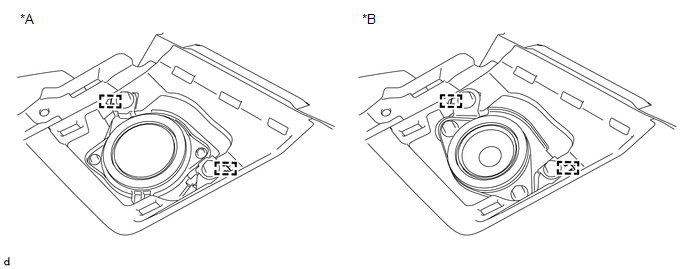 Text in Illustration
|
*A |
for 9 Speakers |
*B |
for 8 Speakers |
(c) Install the front No. 2 speaker assembly with the 2 screws.
Torque:
2.5 N·m {25 kgf·cm, 22 in·lbf}
NOTICE:
- Do not touch the cone of the front No. 2 speaker assembly.
- When installing the front No. 2 speaker assembly to the instrument panel sub-assembly, be careful that the wires do not get caught between the parts.
3. INSTALL NO. 1 INSTRUMENT PANEL SPEAKER PANEL SUB-ASSEMBLY
.gif)
4. INSTALL FRONT PILLAR GARNISH LH
 Front Door Speaker
Components
COMPONENTS
ILLUSTRATION
Removal
REMOVAL
CAUTION / NOTICE / HINT
HINT:
Use the same procedure for the RH and LH sides.
The procedure listed below is for the LH side. ...
 Luggage Speaker
...
Other materials about Toyota 4Runner:
Center Airbag Sensor Assembly Communication Circuit Malfunction (B1790)
DESCRIPTION
The center airbag sensor communication circuit consists of the occupant classification
ECU and center airbag sensor.
DTC B1790 is stored when a malfunction is detected in the center airbag sensor
communication circuit.
DTC Code
...
Open in Pump Motor Circuit (C1251)
DESCRIPTION
The motor relay (semiconductor relay) is built into the master cylinder solenoid
and drives the pump motor based on a signal from the skid control ECU.
DTC Code
DTC Detection Condition
Trouble Area
...

0.0073