
Toyota 4Runner: Removal
REMOVAL
CAUTION / NOTICE / HINT
HINT:
- Use the same procedure for both the RH and LH sides.
- The procedure listed below is for the LH side.
PROCEDURE
1. REMOVE FRONT FENDER MUDGUARD LH (w/o Intuitive Parking Assist System)
.gif)
2. REMOVE FRONT FENDER MUDGUARD LH (w/ Intuitive Parking Assist System)
3. REMOVE ROCKER PANEL MOULDING COVER LH (w/o Intuitive Parking Assist System)
|
(a) Remove the screw. |
|
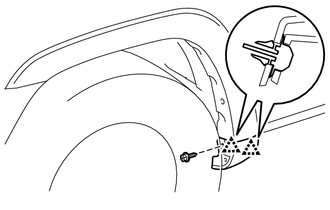
(b) Detach the 2 clips to remove the rocker panel moulding cover LH.
4. REMOVE ROCKER PANEL MOULDING LH (w/ Intuitive Parking Assist System)
5. REMOVE FRONT FENDER MOULDING SUB-ASSEMBLY LH
|
(a) Put protective tape around the front fender moulding sub-assembly LH. Text in Illustration
|
|
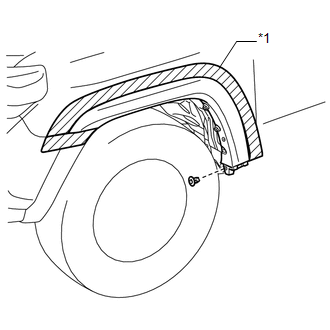
(b) Remove the grommet.
(c) w/ Intuitive Parking Assist System:
(1) Remove the clip.
|
(d) Remove the 6 screws. |
|
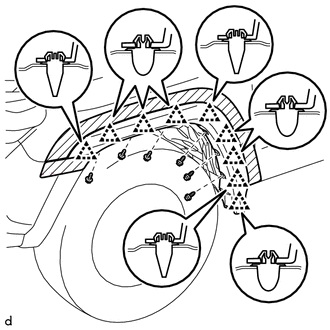
(e) Using a moulding remover, detach the 9 clips to remove the front fender moulding sub-assembly LH.
(f) Remove the 9 clips.
6. REMOVE REAR DOOR OUTSIDE MOULDING LH (w/o Intuitive Parking Assist System)
|
(a) Put protective tape around the rear door outside moulding LH. Text in Illustration
|
|
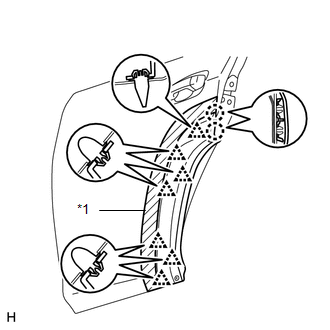
(b) Using a moulding remover, detach the 7 clips and 2 claws to remove the rear door outside moulding LH.
(c) Remove the 7 clips.
7. REMOVE REAR DOOR OUTSIDE MOULDING LH (w/ Intuitive Parking Assist System)
|
(a) Put protective tape around the rear door outside moulding LH. Text in Illustration
|
|
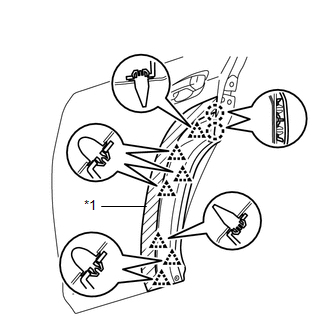
(b) Using a moulding remover, detach the 7 clips and 2 claws to remove the rear door outside moulding LH.
(c) Remove the 7 clips.
8. REMOVE NO. 3 OUTSIDE MOULDING RETAINER
|
(a) Remove the screw. |
|
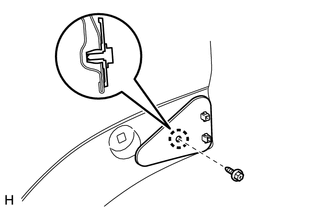
(b) Detach the claw to remove the No. 3 outside moulding retainer.
9. REMOVE REAR QUARTER OUTSIDE MOULDING LH
|
(a) Put protective tape around the rear quarter outside moulding LH. Text in Illustration
|
|
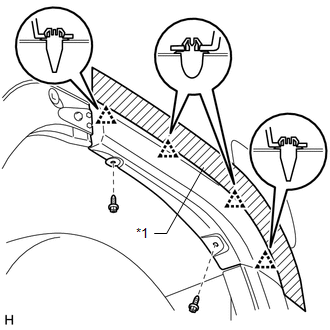
(b) Remove the 2 screws.
(c) Using a moulding remover, detach the 4 clips to remove the rear quarter outside moulding LH.
(d) Remove the 4 clips.
 Disassembly
DISASSEMBLY
CAUTION / NOTICE / HINT
HINT:
Use the same procedure for the RH and LH sides.
The procedure listed below is for the LH side.
PROCEDURE
1. REMOVE FRONT FENDER OUTSIDE ...
 Reassembly
REASSEMBLY
CAUTION / NOTICE / HINT
HINT:
Use the same procedure for the RH and LH sides.
The procedure listed below is for the LH side.
When installing the pad, heat the moulding su ...
Other materials about Toyota 4Runner:
Diagnosis System
DIAGNOSIS SYSTEM
DESCRIPTION
(a) Diagnostic Trouble Codes (DTCs) can be read from the Data Link Connector
3 (DLC3) of the vehicle. When the rear view monitor system seems to be malfunctioning,
use the Techstream to check for malfunctions and to perform r ...
Compass
The compass on the accessory meter display indicates the direction in
which the vehicle is heading.
1. “MODE/ ” button
2. “SET/ ” button
3. Direction display
Displays and directions
Calibrating the compass
The direction display deviates ...

0.0235