
Toyota 4Runner: Removal
REMOVAL
PROCEDURE
1. DISCONNECT CABLE FROM NEGATIVE BATTERY TERMINAL
NOTICE:
When disconnecting the cable, some systems need to be initialized after the cable
is reconnected (See page .gif) ).
).
2. REMOVE LOWER STEERING COLUMN COVER
|
(a) Turn the steering wheel to the left and remove the screw. |
|
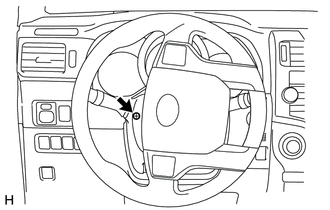
|
(b) Turn the steering wheel to the right and remove the screw. |
|
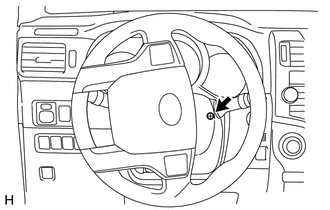
|
(c) Detach the 2 claws and remove the lower steering column cover. |
|
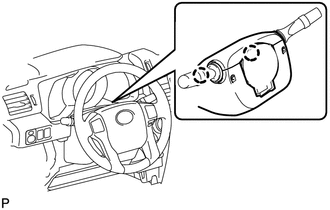
3. REMOVE UPPER STEERING COLUMN COVER
|
(a) Detach the 4 clips and claw and remove the steering column cover. |
|
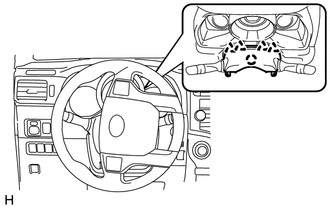
4. REMOVE WINDSHIELD WIPER SWITCH ASSEMBLY
|
(a) Disconnect the 2 connectors. |
|
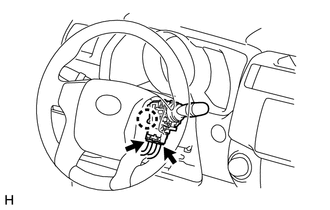
(b) Detach the claw and remove the windshield wiper switch assembly.
 Components
COMPONENTS
ILLUSTRATION
...
 Inspection
INSPECTION
PROCEDURE
1. INSPECT WINDSHIELD WIPER SWITCH ASSEMBLY
(a) Measure the resistance according to the value(s) in the table below.
Standard Resistance:
Front Wiper Switch
...
Other materials about Toyota 4Runner:
Dtc Check / Clear
DTC CHECK / CLEAR
1. CHECK DTC
(a) Connect the Techstream to the DLC3.
(b) Turn the engine switch on (IG).
(c) Turn the Techstream on.
(d) Enter the following menus: Body Electrical / Smart Key / Trouble Codes.
(e) Check for DTCs.
2. CLEAR DTC
(a) Conn ...
Reassembly
REASSEMBLY
PROCEDURE
1. BEARING POSITION
Bearing and Race Diameter:
Mark
Front Race Diameter Inside/Outside
Thrust Bearing Diameter Inside/Outside
Rear Race Diameter Inside/Outside
A
...

0.0122