
Toyota 4Runner: Removal
REMOVAL
PROCEDURE
1. REMOVE NO. 1 INSTRUMENT CLUSTER FINISH PANEL GARNISH
.gif)
2. REMOVE NO. 2 INSTRUMENT CLUSTER FINISH PANEL GARNISH
3. REMOVE HEATER CONTROL ASSEMBLY
4. REMOVE SHIFT LEVER KNOB SUB-ASSEMBLY
5. REMOVE SHIFT LEVER KNOB SUB-ASSEMBLY (for VF2A)
6. REMOVE UPPER CONSOLE PANEL SUB-ASSEMBLY
7. REMOVE NO. 2 CONSOLE BOX RETAINER
8. REMOVE LOWER CENTER INSTRUMENT CLUSTER FINISH PANEL SUB-ASSEMBLY (w/ Climate Control Seat System)
9. REMOVE LOWER CENTER INSTRUMENT CLUSTER FINISH PANEL SUB-ASSEMBLY (w/o Climate Control Seat System)
10. REMOVE POWER OUTLET SOCKET ASSEMBLY
(a) Remove the power outlet socket assembly (w/ Climate Control Seat System).
|
(1) Using a screwdriver, detach the claw to remove the power outlet socket assembly. Text in Illustration
HINT: Tape the screwdriver tip before use. |
|
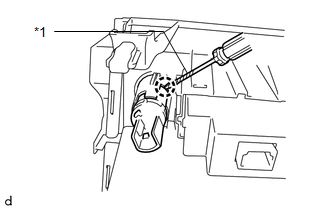
(b) Remove the power outlet socket assembly (w/o Climate Control Seat System).
|
(1) Using a screwdriver, detach the claw to remove the power point socket assembly. Text in Illustration
HINT: Tape the screwdriver tip before use. |
|
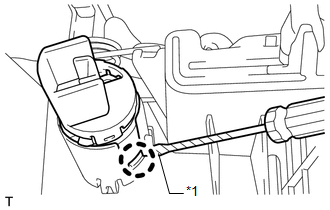
11. REMOVE POWER OUTLET SOCKET COVER
(a) Remove the power outlet socket cover (w/ Climate Control Seat System).
|
(1) Detach the 2 claws to remove the power outlet socket cover. |
|
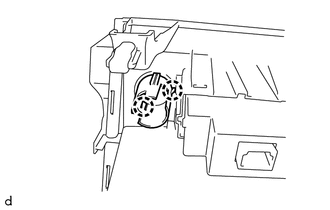
(b) Remove the power outlet socket cover (w/o Climate Control Seat System).
|
(1) Detach the 2 claws to remove the power outlet socket cover. |
|
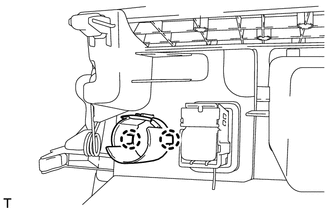
 Components
COMPONENTS
ILLUSTRATION
ILLUSTRATION
...
 Installation
INSTALLATION
PROCEDURE
1. INSTALL POWER OUTLET SOCKET COVER
(a) Attach the 2 claws to install the socket cover.
2. INSTALL POWER OUTLET SOCKET ASSEMBLY
(a) Attach the claw to install the power ou ...
Other materials about Toyota 4Runner:
XM Tuner Antenna Disconnected (B15FE,B15FF)
DESCRIPTION
These DTCs are stored when a malfunction occurs in the satellite radio antenna
assembly which is connected to the stereo component tuner assembly.
DTC No.
DTC Detection Condition
Trouble Area
B1 ...
IG Power Source Circuit
DESCRIPTION
The main power source is supplied to the air conditioning amplifier assembly
when the ignition switch is turned to ON. The power source is used for operating
the air conditioning amplifier assembly, servo motors, etc.
WIRING DIAGRAM
CAUTIO ...

0.009