
Toyota 4Runner: Removal
REMOVAL
PROCEDURE
1. DISCONNECT CABLE FROM NEGATIVE BATTERY TERMINAL
CAUTION:
Wait at least 90 seconds after disconnecting the cable from the negative (-) battery terminal to disable the SRS system.
NOTICE:
When disconnecting the cable, some systems need to be initialized after the cable
is reconnected (See page .gif) ).
).
2. REMOVE REAR NO. 1 SEAT ASSEMBLY
(a) for 60/40 Split Double-folding Seat Type LH Side
(1) Remove the rear No. 1 seat assembly (See page
).
(b) for 60/40 Split Double-folding Seat Type RH Side
(1) Remove the rear No. 1 seat assembly (See page
).
(c) for 60/40 Split Slide Walk-in Seat Type LH Side
(1) Remove the rear No. 1 seat assembly (See page
).
(d) for 60/40 Split Slide Walk-in Seat Type RH Side
(1) Remove the rear No. 1 seat assembly (See page
).
3. REMOVE REAR NO. 1 FLOOR STEP COVER (w/ Rear No. 2 Seat)
4. REMOVE QUARTER SCUFF PLATE LH (w/ Rear No. 2 Seat)
5. REMOVE QUARTER SCUFF PLATE RH (w/ Rear No. 2 Seat)
6. REMOVE REAR DOOR SCUFF PLATE LH
7. REMOVE REAR DOOR SCUFF PLATE RH
8. REMOVE REAR FLOOR SIDE AIRBAG SENSOR COVER
(a) Fold back the floor carpet.
|
(b) Detach the clip and claw, and remove the cover. |
|
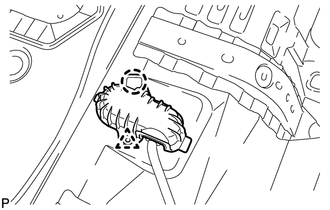
9. REMOVE REAR FLOOR SIDE AIRBAG SENSOR
|
(a) Remove the bolt and sensor. |
|
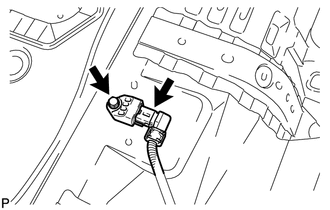
(b) Disconnect the connector.
 Installation
INSTALLATION
PROCEDURE
1. INSTALL REAR FLOOR SIDE AIRBAG SENSOR
(a) Turn the ignition switch off.
(b) Disconnect the cable from the negative (-) battery terminal.
CAUTION:
Wait at least 90 secon ...

Other materials about Toyota 4Runner:
Removal
REMOVAL
CAUTION / NOTICE / HINT
CAUTION:
Wear protective gloves. Sharp areas on the parts may injure your hands.
PROCEDURE
1. REMOVE REAR SEAT ASSEMBLY LH
(a) Remove the rear seat assembly LH (See page
).
2. REMOVE REAR SEAT UPPER RECLINING COVER LH
...
All Power Windows do not Operate with Driver Side Door Key Cylinder or Wireless
Transmitter
DESCRIPTION
When a key switch is pushed: 1) the door control receiver receives the
key signal; 2) the door control receiver sends a signal to the certification
ECU; 3) the main body ECU (multiplex network body ECU) sends the operation
permi ...

0.027