
Toyota 4Runner: Removal
REMOVAL
CAUTION / NOTICE / HINT
NOTICE:
Take extra care when handling these precision electronic components.
PROCEDURE
1. REMOVE TRANSMITTER HOUSING COVER
NOTICE:
Take extra care when handling these precision electronic components.
|
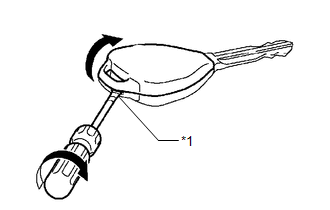
(a) Twist a screwdriver in the direction of the arrow in the illustration and open the transmitter housing cover. NOTICE: Do not forcibly pry open the cover. HINT: Tape the screwdriver tip before use. Text in Illustration
|
|
2. REMOVE DOOR CONTROL TRANSMITTER MODULE
|
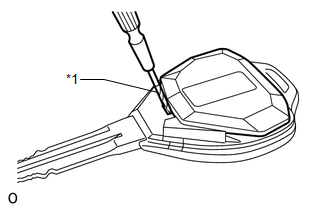
(a) Using a precision screwdriver, remove the door control transmitter module. HINT: Tape the screwdriver tip before use. Text in Illustration
|
|
3. REMOVE DOOR CONTROL TRANSMITTER PACKING
4. REMOVE TRANSMITTER BATTERY
|
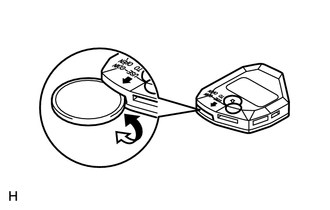
(a) Twist a coin in the direction of the arrow in the illustration and remove the transmitter battery cover. |
|
|
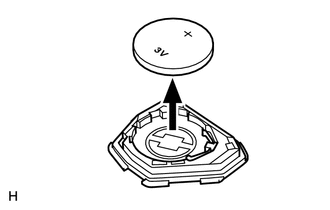
(b) Remove the battery (lithium battery: CR2016). NOTICE:
|
|
 Components
COMPONENTS
ILLUSTRATION
...
 Inspection
INSPECTION
PROCEDURE
1. INSPECT DOOR CONTROL TRANSMITTER MODULE
(a) Inspect the operation of the transmitter.
(1) Remove the battery (lithium battery) from the transmitter (See page
).
...
Other materials about Toyota 4Runner:
Abbreviations Used In Manual
ABBREVIATIONS USED IN MANUAL
Abbreviation
Meaning
ABS
Anti-Lock Brake System
A/C
Air Conditioner
AC
Alternating Current
ACC
A ...
Active traction control system
The active traction control system automatically helps prevent the
spinning of 4 wheels when the vehicle is started or accelerated on slippery road
surfaces.
System operation
Part-time 4WD models:
Stop the vehicle, shift the shift lever to N and shift ...

0.0189