
Toyota 4Runner: Floor mat
Use only floor mats designed specifically for vehicles of the same model and model year as your vehicle. Fix them securely in place onto the carpet.
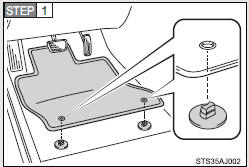
Insert the retaining hooks (clips) into the floor mat eyelets.
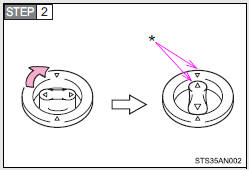
Turn the upper knob of each retaining hook (clip) to secure the floor mats in place.
*: Always align the Δ marks.
The shape of the retaining hooks (clips) may differ from that shown in the illustration.
CAUTION
Observe the following precautions.
Failure to do so may cause the driver's floor mat to slip, possibly interfering with the pedals while driving. An unexpectedly high speed may result or it may become difficult to stop the vehicle, leading to a serious accident which may result in death or serious injury.
When installing the driver's floor mat
• Do not use floor mats designed for other models or different model year vehicles, even if they are Toyota Genuine floor mats.
• Only use floor mats designed for the driver's seat.
• Always install the floor mat securely using the retaining hooks (clips) provided.
• Do not use two or more floor mats on top of each other.
• Do not place the floor mat bottom-side up or upside-down.
Before driving
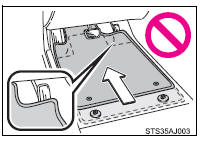
• Check that the floor mat is securely fixed in the correct place with all the provided retaining hooks (clips). Be especially careful to perform this check after cleaning the floor.
• With the engine stopped and the shift lever in P, fully depress each pedal to the floor to make sure it does not interfere with the floor mat.
 Assist grips
An assist grip (type A) installed on the ceiling can be used to support
your body while sitting on the seat.
An assist grip (type B) installed on the pillar can be used when getting in
or out of ...
 Compass
The compass on the accessory meter display indicates the direction in
which the vehicle is heading.
1. “MODE/ ” button
2. “SET/ ” button
3. Direction display
Displays and directions
...
Other materials about Toyota 4Runner:
IG2 Signal Malfunction (B2788)
DESCRIPTION
The steering lock ECU determines the on/off status of the engine switch through
the IG2 signal circuit.
The steering lock ECU does not lock the steering when it receives the IG2 relay
on signal. This prevents the steering from being locked wh ...
System Description
SYSTEM DESCRIPTION
1. ENGINE IMMOBILISER SYSTEM DESCRIPTION
(a) The engine immobiliser system determines whether or not to enable starting
of the SFI system based on a comparison of the key ID code and the vehicle pre-registered
code. The engine immobili ...

0.0082