
Toyota 4Runner: Folding down the rear seats (vehicles without third row seats)
Before folding down the rear seats
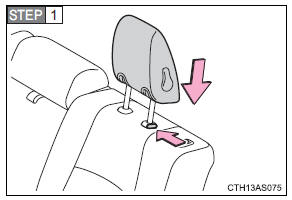
Adjust the head restraints to the downmost position.
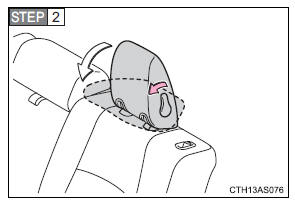
Fold down the head restraints.
When returning the head restraints to their original positions, make sure they are locked securely.
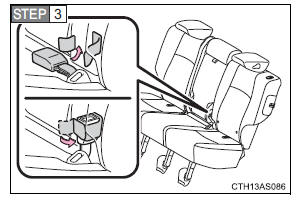
Stow the rear seat belt buckles.
Folding down the rear seats
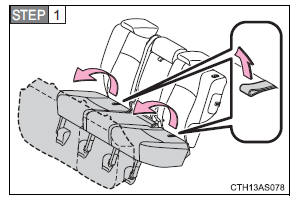
Swing the bottom cushions up by pulling the lock release strap.
When returning the rear seat cushions to their original positions, make sure they are locked securely.
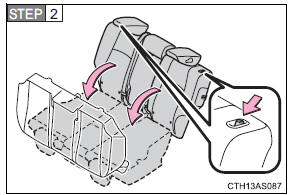
Push the lock release button and fold down the seatbacks.
To return the rear seatbacks to their original positions, lift them up until they lock.
Folding down rear center seatback only
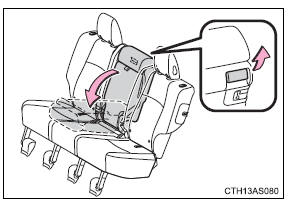
Pull the center seatback angle lever behind the seatback and fold the seatback down.
To return the rear center seatback to its original position, lift it up until it locks.
 Rear seats
Vehicles without third row seats
Rear seat
Pull up the seatback angle adjustment lever until the lock is released.
Vehicles with third row seats
Second row seats
1. Seat position adjustment l ...
 Folding down the second row seats (vehicles with third row seats)
Before folding down the second row seats
Adjust the head restraints to the downmost position.
Stow the second row seat belt buckles.
Folding down the second row seats
Pull the seatback lock ...
Other materials about Toyota 4Runner:
Dtc Check / Clear
DTC CHECK / CLEAR
1. CHECK DTC
(a) Connect the Techstream to the DLC3.
(b) Turn the engine switch on (IG).
(c) Turn the Techstream on.
(d) Enter the following menus: Body Electrical / Smart Key / Trouble Codes.
(e) Check for DTCs.
2. CLEAR DTC
(a) Conn ...
Differential Oil
Replacement
REPLACEMENT
PROCEDURE
1. INSPECT DIFFERENTIAL OIL LEVEL
(a) Stop the vehicle on a level surface.
(b) Remove the differential filler plug and gasket.
(c) Check that the oil level is within 0 to 5 mm (0 to 0.197 in.) of
the bot ...

0.0083