
Toyota 4Runner: Mudguard
Components
COMPONENTS
ILLUSTRATION
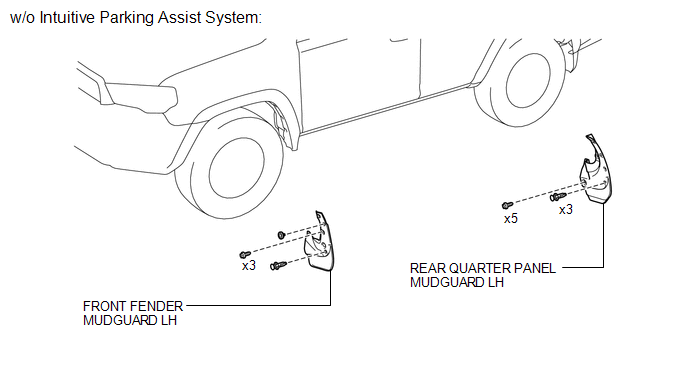
ILLUSTRATION
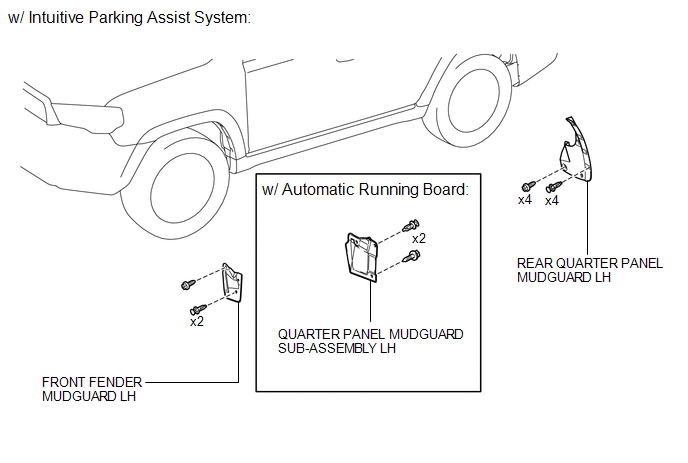
Removal
REMOVAL
CAUTION / NOTICE / HINT
HINT:
- Use the same procedure for both the RH and LH sides.
- The procedure listed below is for LH side.
PROCEDURE
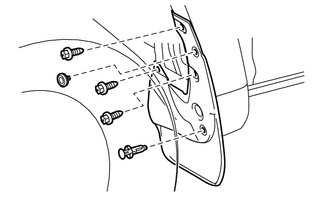
1. REMOVE FRONT FENDER MUDGUARD LH (w/o Intuitive Parking Assist System)
|
(a) Remove the 2clips, 3 screws and front fender mudguard LH. |
|
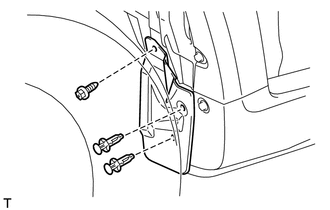
2. REMOVE FRONT FENDER MUDGUARD LH (w/ Intuitive Parking Assist System)
|
(a) Remove the 2 clips, screw and front fender mudguard LH. |
|
3. REMOVE QUARTER PANEL MUDGUARD SUB-ASSEMBLY LH (w/ Automatic Running Board)
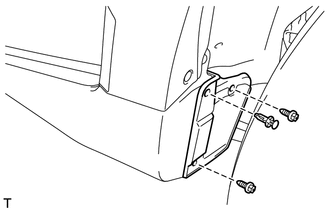
(a) Remove the clip, 2 screws and quarter panel mudguard sub-assembly LH.
4. REMOVE REAR QUARTER PANEL MUDGUARD LH (w/o Intuitive Parking Assist System)
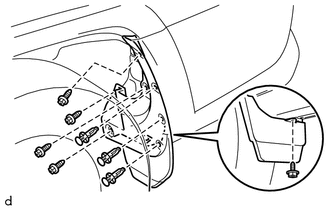
(a) Remove the 3 clips, 5 screws and rear quarter panel mudguard LH.
5. REMOVE REAR QUARTER PANEL MUDGUARD LH (w/ Intuitive Parking Assist System)
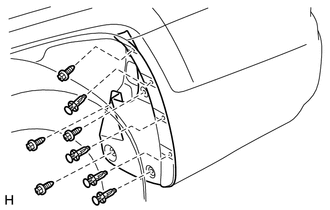
(a) Remove the 4 clips, 4 screws and rear quarter panel mudguard LH.
Installation
INSTALLATION
CAUTION / NOTICE / HINT
HINT:
- Use the same procedure for both the RH and LH sides.
- The procedure listed below is for LH side.
PROCEDURE
1. INSTALL FRONT FENDER MUDGUARD LH (w/o Intuitive Parking Assist System)
(a) Install the front fender mudguard LH with the 3 screws and 2clips.
2. INSTALL FRONT FENDER MUDGUARD LH (w/ Intuitive Parking Assist System)
(a) Install the front fender mudguard LH with the screw and 2 clips.
3. INSTALL QUARTER PANEL MUDGUARD SUB-ASSEMBLY LH (w/ Automatic Running Board)
(a) Install the quarter panel mudguard sub-assembly LH with the 2 screws and clip.
4. INSTALL REAR QUARTER PANEL MUDGUARD LH (w/o Intuitive Parking Assist System)
(a) Install the rear quarter panel mudguard LH with the 5 screws and 3 clips.
5. INSTALL REAR QUARTER PANEL MUDGUARD LH (w/ Intuitive Parking Assist System)
(a) Install the rear quarter panel mudguard LH with the 4 screws and 4 clips.
 Installation
INSTALLATION
CAUTION / NOTICE / HINT
HINT:
Use the same procedure for the RH and LH sides.
The procedure listed below is for the LH side.
When installing the window frame moulding, ...
 Name Plate
...
Other materials about Toyota 4Runner:
Door Courtesy Light(for Front Door)
Components
COMPONENTS
ILLUSTRATION
Removal
REMOVAL
CAUTION / NOTICE / HINT
HINT:
Use the same procedure for the RH and LH sides.
The procedure listed below is for the LH side.
PROCEDURE
1. REMOVE FRONT DOOR LOWER FRAME BRACKET ...
Open Circuit in Transfer 4WD Position Switch Circuit (C1258,C1340)
DESCRIPTION
DTC Code
DTC Detection Condition
Trouble Area
C1258*1
C1340*2
An open circuit is detected in the EXI circuit of the skid control ECU.
Harness or connector
...

0.0073