
Toyota 4Runner: Removal
REMOVAL
PROCEDURE
1. REMOVE ASSIST STRAP HOLE COVER
.gif)
2. REMOVE ASSIST STRAP ASSEMBLY
3. REMOVE BACK DOOR TRIM PANEL ASSEMBLY
4. REMOVE MULTIPLEX NETWORK DOOR ECU
5. REMOVE NO. 2 BACK DOOR SERVICE HOLE COVER
6. REMOVE BACK DOOR LOCK CYLINDER (w/o Smart Key System)
7. REMOVE BACK DOOR OUTSIDE GARNISH (w/o Smart Key System)
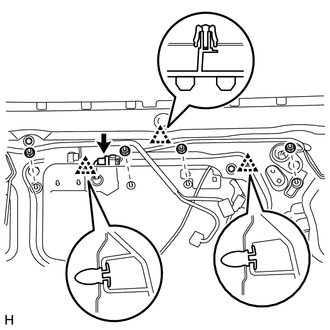
(a) Disconnect the connector.
(b) Remove the 4 nuts.
(c) Detach the 3 clips and remove the back door outside garnish.
8. REMOVE BACK DOOR OUTSIDE GARNISH (w/ Smart Key System)
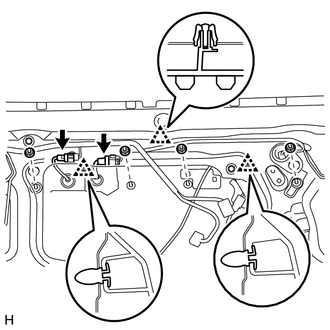
(a) Disconnect the 2 connectors.
(b) Remove the 4 nuts.
(c) Detach the 3 clips and back door outside garnish.
 Components
COMPONENTS
ILLUSTRATION
ILLUSTRATION
...
 Disassembly
DISASSEMBLY
PROCEDURE
1. REMOVE BACK DOOR OPENER SWITCH ASSEMBLY
2. REMOVE NO. 2 BACK DOOR OUTSIDE GARNISH
(a) Detach the 2 clips and No. 2 back door outside garnish.
3. REMOVE LICENSE PLATE ...
Other materials about Toyota 4Runner:
Inverter Main Switch
Components
COMPONENTS
ILLUSTRATION
Installation
INSTALLATION
PROCEDURE
1. INSTALL MAIN SWITCH ASSEMBLY
(a) Attach the 2 claws to install the main switch.
2. INSTALL LOWER INSTRUMENT PANEL FINISH PANEL SUB-ASSEMBLY
3. INSTALL COWL SIDE TRIM BO ...
If the vehicle becomes stuck
Carry out the following procedures if the tires spin or the vehicle
becomes stuck in mud, dirt or snow:
Stop the engine. Set the parking
brake and shift the shift lever to P.
Remove the mud, snow or sand
from around the stuck tire.
Place wood, ston ...

0.0207