
Toyota 4Runner: Room Light(for Front)
Components
COMPONENTS
ILLUSTRATION
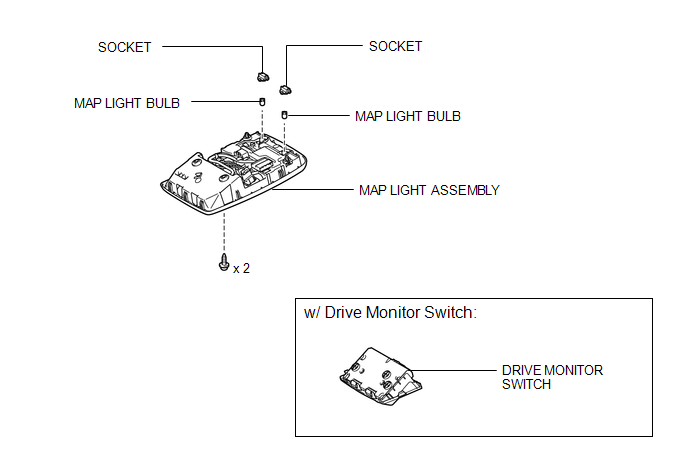
Inspection
INSPECTION
PROCEDURE
1. INSPECT MAP LIGHT ASSEMBLY
|
(a) Measure the resistance according to the value(s) in the table below. Standard Resistance:
|
|
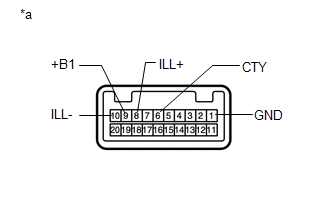
(b) Apply battery voltage to the connector and check the LED illumination.
OK:
|
Condition |
Specified Condition |
|---|---|
|
Battery positive (+) → Terminal 8 (ILL+) Battery negative (-) → Terminal 10 (ILL-) |
LED illuminates |
|
*a |
Component without harness connected (Map Light Assembly) |
If the result is not as specified, replace the map light assembly.
Removal
REMOVAL
PROCEDURE
1. REMOVE DRIVE MONITOR SWITCH (w/ Drive Monitor Switch)
|
(a) Detach the 4 claws to remove the drive monitor switch. |
|
.png)
(b) Disconnect the connector.
2. REMOVE MAP LIGHT ASSEMBLY
(a) Open the cover (w/o Drive Monitor Switch).
|
(b) Remove the 2 screws. |
|
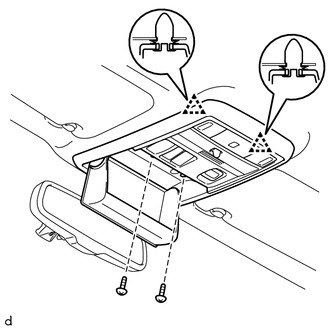
(c) Detach the 2 clips to remove the map light assembly.
(d) Disconnect the connector.
3. REMOVE MAP LIGHT BULB
|
(a) Turn the 2 sockets in the direction indicated by the arrows to remove them. |
|
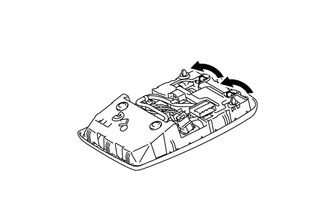
(b) Remove the 2 map light bulbs from the sockets.
Installation
INSTALLATION
PROCEDURE
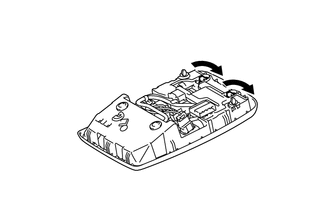
1. INSTALL MAP LIGHT BULB
(a) Install the 2 map light bulbs to the sockets.
|
(b) Turn the 2 sockets in the direction indicated by the arrows to install them. |
|
2. INSTALL MAP LIGHT ASSEMBLY
(a) Connect the connector.
(b) Attach the 2 clips to install the map light assembly.
(c) Install the 2 screws.
(d) Close the cover (w/o Drive Monitor Switch).
3. INSTALL DRIVE MONITOR SWITCH (w/ Drive Monitor Switch)
(a) Connect the connector.
(b) Attach the 4 claws to install the drive monitor switch.
 Relay
Relay
On-vehicle Inspection
ON-VEHICLE INSPECTION
PROCEDURE
1. INSPECT DOME RELAY
(a) Measure the resistance according to the value(s) in the table below.
Standard Resistance:
...
 Room Light(for Rear)
Components
COMPONENTS
ILLUSTRATION
Installation
INSTALLATION
PROCEDURE
1. INSTALL NO. 1 ROOM LIGHT ASSEMBLY
(a) Align the switch parts as shown in the illustration and attach t ...
Other materials about Toyota 4Runner:
Test Mode Procedure
TEST MODE PROCEDURE
1. PERFORM SIGNAL CHECK
HINT:
When entering signal check mode, the tire pressure warning ECU stores
all the signal check DTCs first. After completing the signal check for each
inspection item, the DTCs for systems that ar ...
Lost Communication with Rear Floor Airbag Sensor RH (B1676/85,B1677/85)
DESCRIPTION
HINT:
"Rear floor airbag sensor RH" refers to the rear floor side airbag sensor.
The rear floor side airbag sensor circuit consists of the center airbag
sensor and rear floor side airbag sensor.
The rear floor side airba ...

0.0085