
Toyota 4Runner: Seat Heater Control
Components
COMPONENTS
ILLUSTRATION
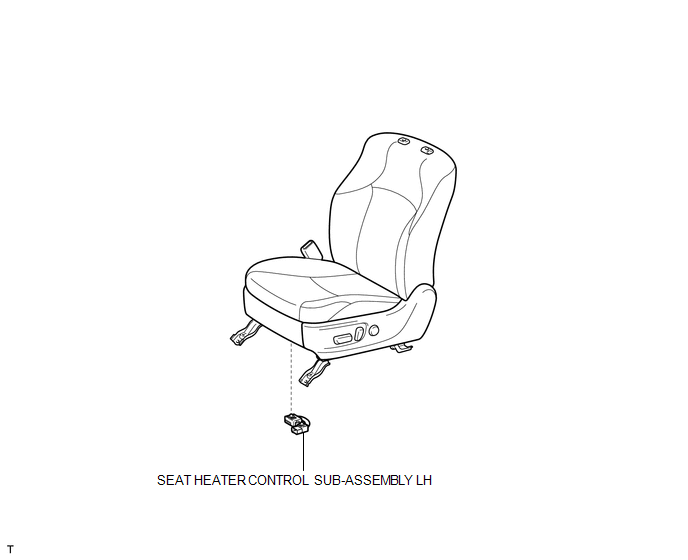
Removal
REMOVAL
CAUTION / NOTICE / HINT
CAUTION:
Wear protective gloves. Sharp areas on the parts may injure your hands.
HINT:
- Use the same procedure for the RH and LH sides.
- The procedure listed below is for the LH side.
PROCEDURE
1. REMOVE FRONT SEAT ASSEMBLY
(a) Remove the front seat assembly (See page .gif)
).
2. REMOVE SEAT HEATER CONTROL SUB-ASSEMBLY LH
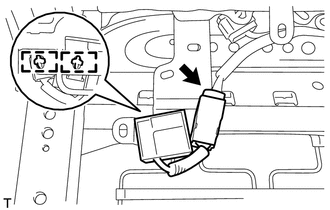
(a) Disconnect the connector.
(b) Detach the 2 clamps and remove the seat heater control.
Installation
INSTALLATION
CAUTION / NOTICE / HINT
CAUTION:
Wear protective gloves. Sharp areas on the parts may injure your hands.
HINT:
- Use the same procedure for the RH and LH sides.
- The procedure listed below is for the LH side.
PROCEDURE
1. INSTALL SEAT HEATER CONTROL SUB-ASSEMBLY LH
(a) Attach the 2 clamps to install the seat heater control.
(b) Connect the connector.
2. INSTALL FRONT SEAT ASSEMBLY
(a) Install the front seat assembly (See page .gif)
).
 Installation
INSTALLATION
CAUTION / NOTICE / HINT
CAUTION:
Wear protective gloves. Sharp areas on the parts may injure your hands.
HINT:
Use the same procedure for the RH and LH sides.
The procedu ...

Other materials about Toyota 4Runner:
Installation
INSTALLATION
PROCEDURE
1. INSTALL INDOOR NO. 2 ELECTRICAL KEY ANTENNA ASSEMBLY
(a) Attach the 2 claws to install the indoor No. 2 electrical key antenna.
(b) Connect the connector.
2. INSTALL NO. 1 LUGG ...
Back Sonar Sensor LH Circuit
DESCRIPTION
The ultrasonic sensor sends and receives ultrasonic waves. Based on the received
wave, the sensor calculates the approximate distance between the vehicle and the
obstacle, and sends the distance value as a signal to the clearance warning ECU
...

0.0263