
Toyota 4Runner: Differential Oil
Replacement
REPLACEMENT
PROCEDURE
1. INSPECT DIFFERENTIAL OIL LEVEL
(a) Stop the vehicle on a level surface.
(b) Remove the differential filler plug and gasket.
|
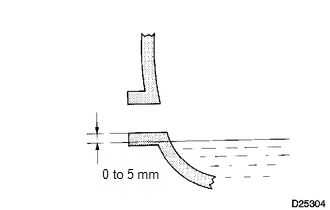
(c) Check that the oil level is within 0 to 5 mm (0 to 0.197 in.) of the bottom of the filler plug opening. NOTICE: Excessively large or small quantities of oil may cause problems. If the oil level is low, add differential oil to adjust the oil level. If the oil level is still low, check for oil leakage. If leakage is found, repair or replace the part necessary to stop the leakage. |
|
(d) Install a new gasket and differential filler plug.
Torque:
Front differential carrier :
39 N·m {398 kgf·cm, 29 ft·lbf}
Rear differential carrier :
49 N·m {500 kgf·cm, 36 ft·lbf}
2. DRAIN DIFFERENTIAL OIL
(a) Stop the vehicle on a level surface.
(b) Remove the differential drain plug and gasket.
(c) Drain the oil.
(d) Install a new gasket and the differential drain plug.
Torque:
Front differential carrier :
65 N·m {660 kgf·cm, 48 ft·lbf}
Rear differential carrier :
49 N·m {500 kgf·cm, 36 ft·lbf}
3. ADD DIFFERENTIAL OIL
(a) Remove the differential filler plug and gasket.
|
(b) Pour oil into the rear differential carrier assembly so that the oil level is within 0 to 5 mm (0 to 0.197 in.) of the bottom of the filler plug opening. NOTICE: Excessively large or small quantities of oil may cause problems. Front Differential Capacity:
Rear Differential Capacity:
|
|
(c) Install a new gasket and the differential filler plug.
Torque:
Front differential carrier :
39 N·m {398 kgf·cm, 29 ft·lbf}
Rear differential carrier :
49 N·m {500 kgf·cm, 36 ft·lbf}
(d) Drive the vehicle and check the oil level again.
If necessary, add differential oil.
 Problem Symptoms Table
PROBLEM SYMPTOMS TABLE
HINT:
Use the table below to help determine the cause of problem symptoms. If multiple
suspected areas are listed, the potential causes of the symptoms are listed in order
...

Other materials about Toyota 4Runner:
Wheels
If a wheel is bent, cracked or heavily corroded, it should be replaced.
Otherwise, the tire may separate from the wheel or cause a loss of handling
control.
Wheel selection
When replacing wheels, care should be taken to ensure that they are
equivalent ...
Disassembly
DISASSEMBLY
CAUTION / NOTICE / HINT
HINT:
Use the same procedure for both the RH and LH sides.
The procedure listed below is for the LH side.
PROCEDURE
1. DISCONNECT CABLE FROM NEGATIVE BATTERY TERMINAL
CAUTION:
Wait at least 90 second ...

0.0166