
Toyota 4Runner: Installation
INSTALLATION
PROCEDURE
1. INSTALL STEERING PAD
|
(a) Support the steering pad with one hand. |
|
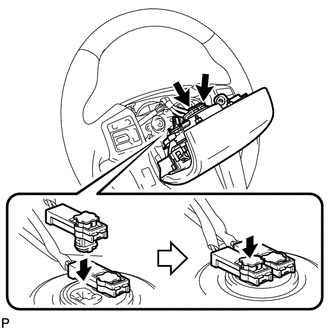
(b) Connect the 2 connectors to the steering pad.
NOTICE:
When handling the airbag connector, take care not to damage the airbag wire harness.
(c) Connect the horn connector.
(d) Confirm that the groove along the circumference of the "TORX" screw is attached to the screw case and place the steering pad onto the steering wheel.
(e) Using a T30 "TORX" socket wrench, tighten the 2 screws.
Torque:
8.8 N·m {90 kgf·cm, 78 in·lbf}
2. INSTALL LOWER NO. 3 STEERING WHEEL COVER
(a) Attach the 2 claws to install the cover.
3. INSTALL LOWER NO. 2 STEERING WHEEL COVER
|
(a) Attach the 2 claws to install the cover. Text in Illustration
|
|
.png)
4. CONNECT CABLE TO NEGATIVE BATTERY TERMINAL
NOTICE:
When disconnecting the cable, some systems need to be initialized after the cable
is reconnected (See page .gif) ).
).
5. INSPECT STEERING PAD
(a) With the steering pad installed on the vehicle, perform a visual check. If there are any defects as mentioned below, replace the steering pad with a new one:
Cuts, minute cracks or marked discoloration on the steering pad top surface or in the grooved portion.
(b) Make sure that the horn sounds.
If the horn does not sound, inspect the horn system.
6. CHECK SRS WARNING LIGHT
(a) Check the SRS warning light (See page ).
 Disposal
DISPOSAL
CAUTION / NOTICE / HINT
CAUTION:
Before performing pre-disposal deployment of any SRS part, review and closely
follow all applicable environmental and hazardous material regulations. Pre ...

Other materials about Toyota 4Runner:
Adjustment
ADJUSTMENT
CAUTION / NOTICE / HINT
HINT:
Use the same procedure for the RH side and LH side.
The following procedure is for the LH side.
Centering bolts are used to mount the door hinge to the vehicle body
and door. The door cannot b ...
Motor LH Current Senser (62,63)
DESCRIPTION
When the side auto step motor current detection sensor inside the side auto step
controller ECU assembly detects a current of less than 1 A when the automatic running
board is operating, the side auto step controller ECU assembly does not oper ...

0.0069