
Toyota 4Runner: Reassembly
REASSEMBLY
PROCEDURE
1. INSTALL KEY INTERLOCK SOLENOID WIRE (w/o Smart Key System)
(a) Install the key interlock solenoid wire on to the install the ignition switch.
2. INSTALL IGNITION SWITCH ASSEMBLY (w/o Smart Key System)
|
(a) Install the ignition switch onto the steering column upper bracket with the 2 screws. |
|
.png)
3. INSTALL KEY INTERLOCK SOLENOID (w/o Smart Key System)
|
(a) Install the key interlock solenoid onto the steering column upper bracket with the 2 screws. |
|
.png)
(b) Connect the connector.
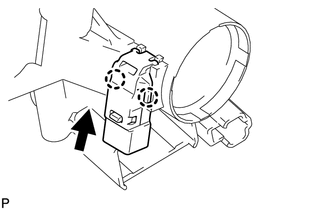
4. INSTALL UNLOCK WARNING SWITCH ASSEMBLY (w/o Smart Key System)
|
(a) Attach the 2 claws to install the unlock warning switch onto the steering column upper bracket. HINT: Slide the unlock warning switch in the direction shown by the arrow in the illustration to install it. |
|
5. INSTALL IGNITION SWITCH LOCK CYLINDER ASSEMBLY (w/o Smart Key System)
(a) Turn the ignition switch to ON (ACC).
|
(b) Install the ignition switch lock cylinder into the steering column upper bracket. |
|
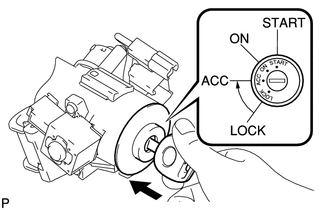
(c) Make sure that the ignition switch lock cylinder is securely fixed onto the ignition switch lock cylinder.
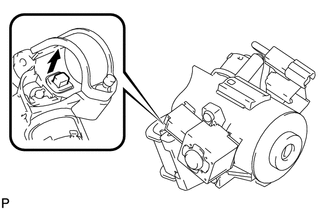
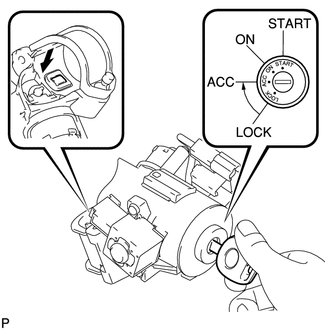
6. INSPECT STEERING LOCK OPERATION (w/o Smart Key System)
|
(a) Remove the key and check that the steering lock function is activated. |
|
|
(b) Insert the key, turn the ignition switch ON (ACC) and check that the steering lock function is deactivated. |
|
7. INSTALL STEERING LOCK ACTUATOR ASSEMBLY
HINT:
When replacing the steering lock actuator assembly (w/ smart key system), perform
key registration (See page .gif) ).
).
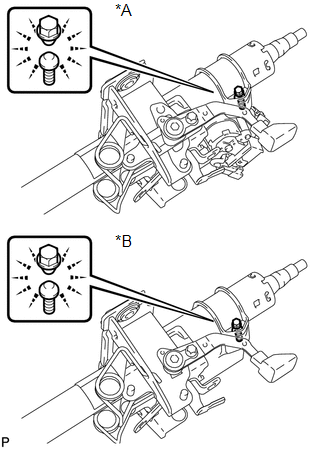
(a) Temporarily install the steering lock actuator assembly with a new tapered-head bolt.
|
(b) Tighten the tapered-head bolt until the bolt head breaks off. Text in Illustration
|
|
 Disassembly
DISASSEMBLY
PROCEDURE
1. REMOVE STEERING LOCK ACTUATOR ASSEMBLY
(a) Using a center punch, mark the center of the tapered-head bolt.
(b) Using a 3 to 4 mm (0.118 to 0.157 in.) drill, drill a hole i ...
 Installation
INSTALLATION
PROCEDURE
1. CONNECT NO. 2 STEERING INTERMEDIATE SHAFT SUB-ASSEMBLY
(a) Align the matchmarks on the No. 2 steering intermediate shaft and power steering
gear.
(b) Install the bolt.
...
Other materials about Toyota 4Runner:
Propeller Shaft System
Problem Symptoms Table
PROBLEM SYMPTOMS TABLE
HINT:
Use the table below to help determine the cause of the problem symptom. The potential
causes of the symptoms are listed in order of probability in the "Suspected Area"
column of the table. ...
Disassembly
DISASSEMBLY
PROCEDURE
1. REMOVE NO. 1 ROOF SILENCER PAD (w/o Sliding Roof)
(a) Remove the No. 1 roof silencer pad.
2. REMOVE NO. 2 ROOF SILENCER PAD
(a) w/o Sliding Roof:
Remove the 2 No. 2 roof silencer pads.
(b) w/ Sliding Roof:
Remo ...

0.0277