
Toyota 4Runner: Removal
REMOVAL
PROCEDURE
1. DISCONNECT CABLE FROM NEGATIVE BATTERY TERMINAL
CAUTION:
Wait at least 90 seconds after disconnecting the cable from the negative (-)
battery terminal to disable the SRS system (See page
.gif) ).
).
NOTICE:
When disconnecting the cable, some systems need to be initialized after the cable
is reconnected (See page ).
2. REMOVE DOOR SCUFF PLATE ASSEMBLY LH
3. REMOVE COWL SIDE TRIM BOARD LH
4. REMOVE NO. 1 INSTRUMENT CLUSTER FINISH PANEL GARNISH
5. REMOVE LOWER INSTRUMENT PANEL FINISH PANEL SUB-ASSEMBLY
6. REMOVE LOWER NO. 1 INSTRUMENT PANEL AIRBAG ASSEMBLY
7. REMOVE DRIVER SIDE JUNCTION BLOCK ASSEMBLY
8. REMOVE SIDE AUTO STEP CONTROLLER ECU ASSEMBLY
|
(a) Disconnect the 2 connectors. |
|
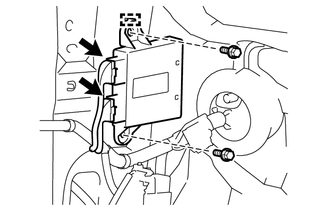
(b) Remove the 2 bolts.
(c) Disengage the guide and remove the side auto step controller ECU assembly.
 Installation
INSTALLATION
CAUTION / NOTICE / HINT
HINT:
A bolt without a torque specification is shown in the standard bolt chart (See
page ).
PROCEDURE
1. INSTALL SIDE AUTO STEP CONTROLLER ECU ASSEMBLY
( ...
 Automatic Running Board Switch
Components
COMPONENTS
ILLUSTRATION
Removal
REMOVAL
PROCEDURE
1. REMOVE DOOR SCUFF PLATE ASSEMBLY LH
2. REMOVE COWL SIDE TRIM BOARD LH
3. REMOVE NO. 1 INSTRUMENT CLUSTER FINISH PANE ...
Other materials about Toyota 4Runner:
Reassembly
REASSEMBLY
PROCEDURE
1. INSTALL DIFFERENTIAL CASE ASSEMBLY
(a) Install the rear differential side gear thrust washer to the rear differential
side gear.
(b) Install the rear differential pinion thrust washer and rear differential
pinion to the rear d ...
Ultrasonic Sensor(for Front)
Components
COMPONENTS
ILLUSTRATION
ILLUSTRATION
Removal
REMOVAL
PROCEDURE
1. REMOVE UPPER RADIATOR SUPPORT SEAL
2. REMOVE FRONT BUMPER COVER
3. REMOVE NO. 2 ENGINE ROOM WIRE
4. REMOVE NO. 1 ULTRASONIC SENSOR
(a) Detach th ...

0.0259