
Toyota 4Runner: Removal
REMOVAL
PROCEDURE
1. REMOVE UPPER RADIATOR SUPPORT SEAL
.gif)
2. REMOVE FRONT BUMPER COVER
(a) Put protective tape around the front bumper cover.
(b) Remove the 3 bolts, 10 screws and 6 clips.
(c) Detach the 14 claws to remove the front bumper cover with radiator grille.
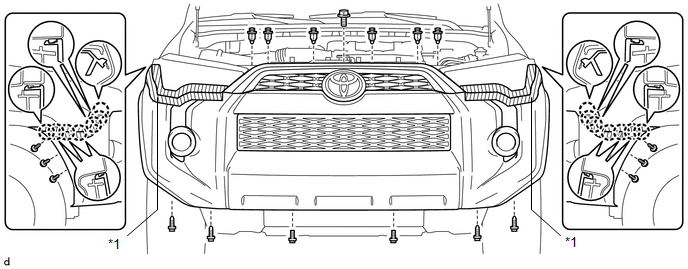 Text in Illustration
|
*1 |
Protective Tape |
- |
- |
(d) Disconnect the 2 connectors.
3. REMOVE UPPER CENTER FRONT BUMPER RETAINER
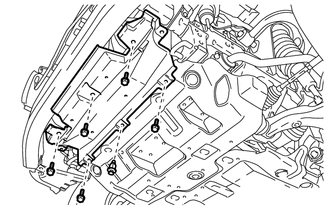
4. REMOVE FRONT BUMPER LOWER COVER
|
(a) Remove the clip, 5 bolts and front lower bumper cover. |
|
5. REMOVE RADIATOR SIDE DEFLECTOR LH
6. REMOVE RADIATOR SIDE DEFLECTOR RH
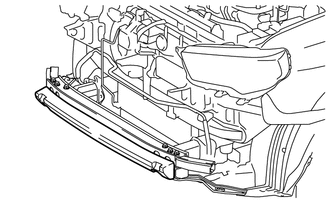
7. REMOVE FRONT BUMPER ENERGY ABSORBER
|
(a) Remove the front bumper energy absorber. |
|
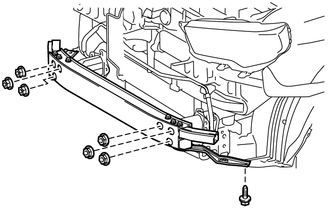
8. REMOVE FRONT BUMPER REINFORCEMENT SUB-ASSEMBLY
|
(a) Remove the 6 nuts, screw and front bumper reinforcement sub-assembly. |
|
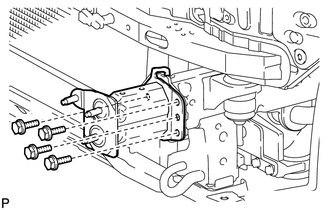
9. REMOVE NO. 2 FRONT BUMPER EXTENSION SUB-ASSEMBLY LH
|
(a) Remove the 4 bolts and No. 2 front bumper extension sub-assembly LH. |
|
10. REMOVE NO. 2 FRONT BUMPER EXTENSION SUB-ASSEMBLY RH
HINT:
Use the same procedure as for the LH side.
11. REMOVE FRONT BUMPER SIDE SUPPORT LH
|
(a) Remove the bolt and screw. |
|
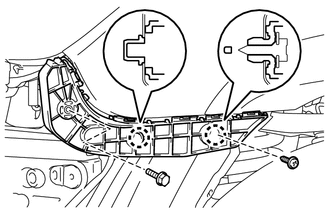
(b) Detach the 2 claws to remove the front bumper side support LH.
12. REMOVE FRONT BUMPER SIDE SUPPORT RH
HINT:
Use the same procedure as for the LH side.
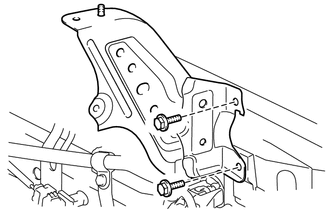
13. REMOVE FRONT BUMPER BRACKET SUB-ASSEMBLY LH
|
(a) Remove the 2 bolts and front bumper bracket sub-assembly LH. |
|
14. REMOVE FRONT BUMPER BRACKET SUB-ASSEMBLY RH
HINT:
Use the same procedure as for the LH side.
 Components
COMPONENTS
ILLUSTRATION
ILLUSTRATION
ILLUSTRATION
...
 Disassembly
DISASSEMBLY
PROCEDURE
1. REMOVE RADIATOR GRILLE
2. REMOVE FRONT BUMPER EXTENSION MOUNTING BRACKET (w/ License Plate Bracket)
(a) Remove the 2 screws to remove the front bumper extens ...
Other materials about Toyota 4Runner:
If you cannot operate back door opener
If the back door opener does not operate, there may be a problem with the
back door opener system. Have the vehicle inspected by your Toyota dealer
immediately.
The following steps may be used as an emergency measure to ensure that the
back door can be ...
Sound of Portable Player cannot be Heard from Speakers or Sound is Low
PROCEDURE
1.
CHECK PORTABLE PLAYER SETTINGS
(a) Check the portable player settings.
(1) Check that the volume is not set to "0".
(2) Check that the mute is off.
(b) Check that the sound of the portable player can ...

0.0089