
Toyota 4Runner: Removal
REMOVAL
PROCEDURE
1. DISCONNECT CABLE FROM NEGATIVE BATTERY TERMINAL
CAUTION:
Wait at least 90 seconds after disconnecting the cable from the negative (-) battery terminal to disable the SRS system.
NOTICE:
When disconnecting the cable, some systems need to be initialized after the cable
is reconnected (See page .gif) ).
).
2. REMOVE DOOR SCUFF PLATE ASSEMBLY RH
|
(a) Put protective tape around the door scuff plate. Text in Illustration
|
|
.png)
(b) Using a screwdriver, detach the 4 clips, 10 claws and 2 guides and remove the door scuff plate.
HINT:
Tape the screwdriver tip before use.
3. REMOVE COWL SIDE TRIM BOARD RH
|
(a) Remove the clip. |
|
.png)
(b) Detach the clip and claw and remove the cowl side trim board.
4. REMOVE NO. 2 INSTRUMENT CLUSTER FINISH PANEL GARNISH
(a) Open the instrument cluster finish panel lid.
(b) Put protective tape around the No. 2 instrument cluster finish panel garnish.
(c) Grip the No. 2 instrument cluster finish panel garnish and pull it diagonally upward toward the rear to detach the 5 clips and remove the No. 2 instrument cluster finish panel garnish.
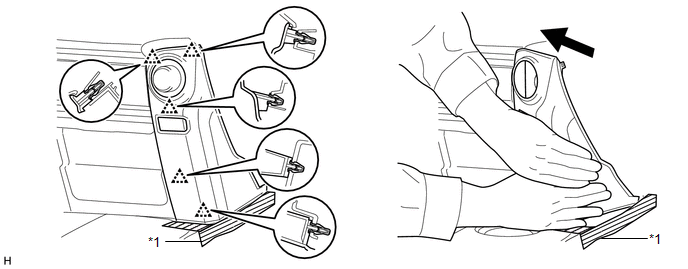 Text in Illustration
|
*1 |
Protective Tape |
- |
- |
5. REMOVE NO. 2 INSTRUMENT PANEL UNDER COVER SUB-ASSEMBLY
6. REMOVE LOWER INSTRUMENT COVER LH
7. REMOVE LOWER NO. 2 INSTRUMENT PANEL AIRBAG ASSEMBLY
8. REMOVE INSTRUMENT PANEL BOX DOOR COVER
9. REMOVE LOWER INSTRUMENT PANEL SUB-ASSEMBLY
10. REMOVE NO. 2 AIR DUCT SUB-ASSEMBLY
11. REMOVE ECU INTEGRATION BOX RH
.png)
(a) Disconnect the connectors and detach the clamp.
(b) Remove the 2 nuts, bolt and ECU integration box RH.
12. REMOVE AIR CONDITIONING AMPLIFIER ASSEMBLY
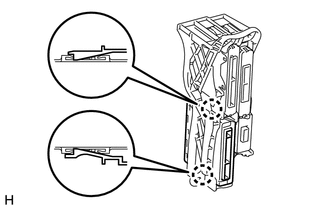
(a) Detach the 2 claws and remove the air conditioning amplifier assembly.
 Installation
INSTALLATION
CAUTION / NOTICE / HINT
HINT:
A bolt without a torque specification is shown in the standard bolt chart (See
page ).
PROCEDURE
1. INSTALL AIR CONDITIONER AMPLIFIER ASSEMBLY
(a) A ...
 Air Conditioning Panel
Components
COMPONENTS
ILLUSTRATION
Installation
INSTALLATION
PROCEDURE
1. INSTALL HEATER CONTROL ASSEMBLY
(a) Attach the 4 clips to install the heater control assembly.
...
Other materials about Toyota 4Runner:
Horn System
Parts Location
PARTS LOCATION
ILLUSTRATION
Problem Symptoms Table
PROBLEM SYMPTOMS TABLE
HINT:
Use the table below to help determine the cause of problem symptoms. If multiple
suspected areas are listed, the potential causes of the symptoms are l ...
Inspection
INSPECTION
PROCEDURE
1. INSPECT SEPARATE TYPE FRONT SEAT CUSHION SPRING ASSEMBLY
(a) for Driver Side:
(1) Check the operation of the separate type front seat cushion spring
assembly (slide motor).
Check that the separate type front seat c ...

0.0066