
Toyota 4Runner: Removal
REMOVAL
PROCEDURE
1. REMOVE REAR NO. 1 FLOOR STEP COVER (w/ Rear No. 2 Seat)
.gif)
2. REMOVE QUARTER SCUFF PLATE RH (w/ Rear No. 2 Seat)
3. REMOVE REAR DOOR SCUFF PLATE RH
4. REMOVE REAR DOOR OPENING TRIM WEATHERSTRIP RH
5. REMOVE OUTER LAP BELT ANCHOR COVER
6. REMOVE NO. 1 LUGGAGE COMPARTMENT TRIM COVER (w/o Deck Board)
7. REMOVE NO. 1 DECK BOARD SUB-ASSEMBLY (w/o Deck Board)
8. REMOVE NO. 2 LUGGAGE COMPARTMENT TRIM COVER (w/ Deck Board, w/o Rear No. 2 Seat)
9. REMOVE NO. 2 DECK BOARD SUB-ASSEMBLY (w/ Deck Board)
10. REMOVE REAR NO. 2 FLOOR BOARD ASSEMBLY (w/ Deck Board)
11. REMOVE LUGGAGE COMPARTMENT SIDE COVER SUB-ASSEMBLY LH (w/ Deck Board)
12. REMOVE LUGGAGE COMPARTMENT SIDE COVER SUB-ASSEMBLY RH (w/ Deck Board)
13. REMOVE DECK BOARD ASSEMBLY (w/ Deck Board)
14. REMOVE INNER FLOOR SIDE RAIL SUB-ASSEMBLY (w/ Deck Board)
15. REMOVE REAR FLOOR MAT REAR SUPPORT PLATE
16. REMOVE REAR FLOOR CARPET ASSEMBLY (w/o Deck Board)
17. REMOVE REAR NO. 1 SEAT OUTER LAP BELT ANCHOR COVER
18. REMOVE NO. 1 LUGGAGE COMPARTMENT TRIM HOOK
19. REMOVE FRONT DECK SIDE TRIM COVER LH
20. REMOVE FRONT DECK SIDE TRIM COVER RH
21. REMOVE NO. 1 LUGGAGE COMPARTMENT TRIM COVER
22. REMOVE DECK TRIM SIDE PANEL ASSEMBLY RH
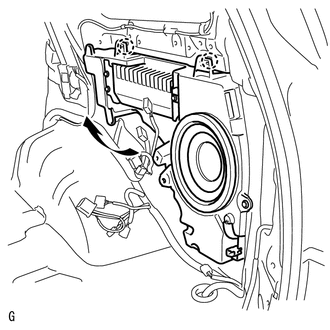
23. REMOVE NO. 1 SPEAKER ASSEMBLY WITH BOX
|
(a) Disconnect the 5 connectors. |
|
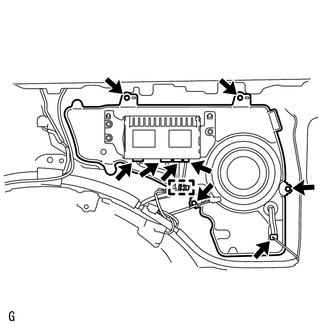
(b) Remove the 4 bolts and detach the clamp.
|
(c) While using the claws as pivot points, lift the No. 1 speaker assembly with box in the direction of the arrow in the illustration to detach the 2 claws and remove the No. 1 speaker assembly with box. |
|
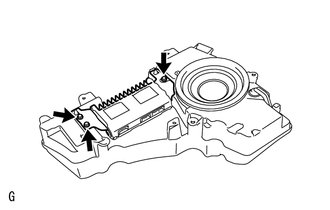
24. REMOVE STEREO COMPONENT AMPLIFIER ASSEMBLY
|
(a) Remove the 3 bolts and stereo component amplifier from the No. 1 speaker assembly with box. |
|
 Components
COMPONENTS
ILLUSTRATION
ILLUSTRATION
ILLUSTRATION
ILLUSTRATION
ILLUSTRATION
...
 Inspection
INSPECTION
PROCEDURE
1. INSPECT NO. 1 SPEAKER ASSEMBLY WITH BOX
(a) Measure the resistance according to the value(s) in the table below.
Standard Resistance:
Test ...
Other materials about Toyota 4Runner:
Rear Occupant Classification Sensor RH Circuit Malfunction (B1783)
DESCRIPTION
The rear occupant classification sensor RH circuit consists of the occupant classification
ECU and rear occupant classification sensor RH.
DTC B1783 is stored when a malfunction is detected in the rear occupant classification
sensor RH circui ...
Power Source Control ECU Malfunction (B2782)
DESCRIPTION
The steering lock ECU activates the steering lock motor with the power from the
power management control ECU through the IGE circuit. This prevents the steering
from being locked while the vehicle is moving.
If NG (PAST) is displayed for Powe ...

0.0069