
Toyota 4Runner: Solar Sensor
Components
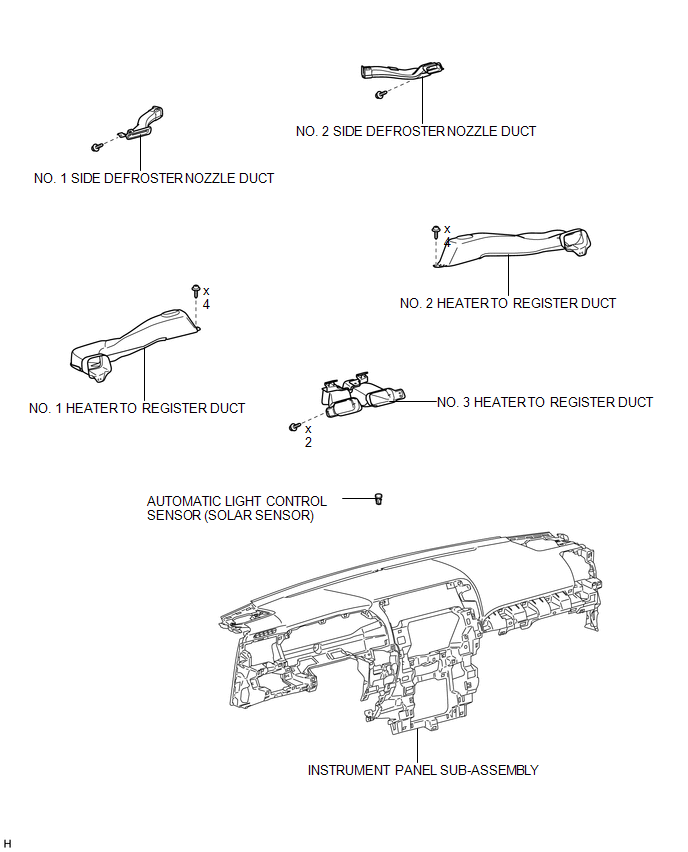
COMPONENTS
ILLUSTRATION
Inspection
INSPECTION
PROCEDURE
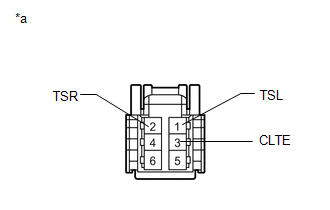
1. INSPECT AUTOMATIC LIGHT CONTROL SENSOR (SOLAR SENSOR)
|
(a) Connect the positive (+) lead of the battery to terminal 6 and the negative (-) lead to terminal 3, and then measure the voltage according to the value(s) in the table below. Standard Voltage:
HINT:
NOTICE: The connection procedure for using a digital tester, such as a TOYOTA electrical tester, is shown above. If the result is not as specified, replace the automatic light control sensor. Text in Illustration
|
|
Removal
REMOVAL
PROCEDURE
1. REMOVE INSTRUMENT PANEL SUB-ASSEMBLY
(a) Remove the instrument panel sub-assembly (See page
.gif) ).
).
2. REMOVE NO. 1 HEATER TO REGISTER DUCT
3. REMOVE NO. 2 HEATER TO REGISTER DUCT
4. REMOVE NO. 1 SIDE DEFROSTER NOZZLE DUCT
5. REMOVE NO. 2 SIDE DEFROSTER NOZZLE DUCT
6. REMOVE NO. 3 HEATER TO REGISTER DUCT
7. REMOVE AUTOMATIC LIGHT CONTROL SENSOR (SOLAR SENSOR)
.png)
(a) Disconnect the connector.
(b) Detach the 2 claws and remove the sensor.
Installation
INSTALLATION
PROCEDURE
1. INSTALL AUTOMATIC LIGHT CONTROL SENSOR (SOLAR SENSOR)
.png)
(a) Attach the 2 claws to install the sensor.
(b) Connect the connector.
2. INSTALL NO. 3 HEATER TO REGISTER DUCT
.gif)
3. INSTALL NO. 2 SIDE DEFROSTER NOZZLE DUCT
4. INSTALL NO. 1 SIDE DEFROSTER NOZZLE DUCT
5. INSTALL NO. 2 HEATER TO REGISTER DUCT
6. INSTALL NO. 1 HEATER TO REGISTER DUCT
7. INSTALL INSTRUMENT PANEL SUB-ASSEMBLY
(a) Install the instrument panel sub-assembly (See page
).
 Room Temperature Sensor
Components
COMPONENTS
ILLUSTRATION
Removal
REMOVAL
PROCEDURE
1. DISCONNECT CABLE FROM NEGATIVE BATTERY TERMINAL
NOTICE:
When disconnecting the cable, some systems need to be initialized ...

Other materials about Toyota 4Runner:
Slip Indicator Light does not Come ON
DESCRIPTION
Refer to Slip Indicator Light Remains ON (See page
).
WIRING DIAGRAM
Refer to Slip Indicator Light Remains ON (See page
).
CAUTION / NOTICE / HINT
NOTICE:
When replacing the master cylinder solenoid, perform calibration (See page
).
PR ...
Air Inlet Damper Control Servo Motor Circuit (B1442/42)
DESCRIPTION
The recirculation damper servo sub-assembly sends pulse signals to inform the
No. 1 air conditioning amplifier assembly of the damper position. The No. 1 air
conditioning amplifier assembly activates the motor (normal or reverse) based on
th ...

0.0073