
Toyota 4Runner: Disassembly
DISASSEMBLY
PROCEDURE
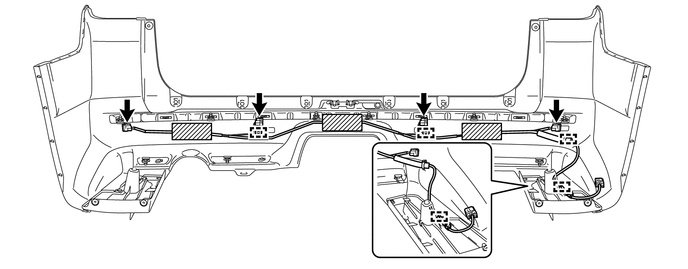
1. REMOVE NO. 3 FLOOR WIRE
(a) Disconnect the 4 connectors and remove the 3 pieces of tape.
(b) Detach the 4 clamps to remove the No. 3 floor wire.
2. REMOVE REAR BUMPER SIDE BRACKET LH
|
(a) Remove the clip and 2 screws. |
|
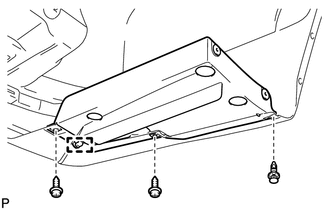
(b) Detach the guide to remove the rear bumper side bracket LH.
3. REMOVE REAR BUMPER SIDE BRACKET RH
HINT:
Use the same procedure as for the LH side.
4. REMOVE REAR BUMPER PLATE LH
|
(a) Remove the 2 outside moulding retainers. |
|
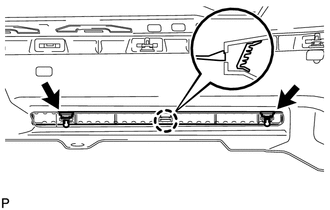
(b) Detach the claw to remove the rear bumper plate LH.
5. REMOVE REAR BUMPER PLATE RH
|
(a) Remove the outside moulding retainer. |
|
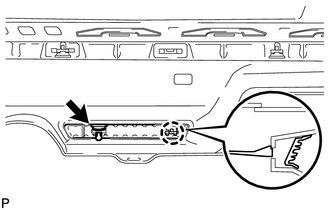
(b) Detach the claw to remove the rear bumper plate RH.
6. REMOVE NO. 1 REAR BUMPER PLATE
|
(a) Remove the outside moulding retainer. |
|
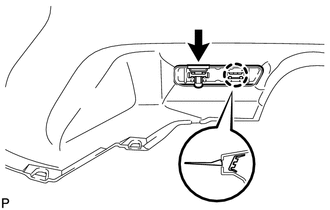
(b) Detach the claw to remove the No. 1 rear bumper plate.
7. REMOVE REAR BUMPER CENTER MOULDING
(a) Remove the 6 outside moulding retainers.
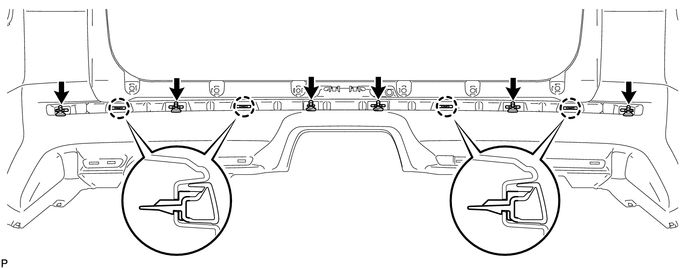
(b) Detach the 4 claws to remove the rear bumper center moulding.
8. REMOVE NO. 1 ULTRASONIC SENSOR
.gif)
9. REMOVE ULTRASONIC SENSOR CLIP
10. REMOVE NO. 2 ULTRASONIC SENSOR RETAINER
11. REMOVE NO. 1 ULTRASONIC SENSOR RETAINER
 Removal
REMOVAL
PROCEDURE
1. REMOVE JACK BOX HOLE COVER
2. REMOVE REAR QUARTER PANEL MUDGUARD LH
3. REMOVE REAR QUARTER PANEL MUDGUARD RH
HINT:
Use the same procedure as for the LH side.
4. REMOV ...
 Reassembly
REASSEMBLY
PROCEDURE
1. INSTALL NO. 1 ULTRASONIC SENSOR RETAINER
2. INSTALL NO. 2 ULTRASONIC SENSOR RETAINER
3. INSTALL ULTRASONIC SENSOR CLIP
4. INSTALL NO. 1 ULTRASONIC SENSOR
5. I ...
Other materials about Toyota 4Runner:
Lost Communication with Back Door Power Window ECU (Abnormal Power Supply) (B2327,B2328)
DESCRIPTION
DTC B2327 is stored when LIN communication between the multiplex network
door ECU (back door P/W) and back door power window regulator motor assembly
stops for 10 seconds or more.
DTC B2328 is stored when a malfunction in the LI ...
Short in Driver Side Squib Circuit (B1800/51-B1803/51)
DESCRIPTION
The driver side squib circuit consists of the center airbag sensor,
spiral cable and steering pad.
The circuit instructs the SRS to deploy when deployment conditions are
met.
These DTCs are stored when a malfunction is detec ...

0.0141