
Toyota 4Runner: Removal
REMOVAL
PROCEDURE
1. REMOVE GENERATOR ASSEMBLY
(a) Remove the generator assembly (See page .gif)
).
2. RECOVER REFRIGERANT FROM REFRIGERATION SYSTEM
3. DISCONNECT DISCHARGE HOSE SUB-ASSEMBLY
|
(a) Remove the bolt and disconnect the discharge hose from the cooler compressor. |
|
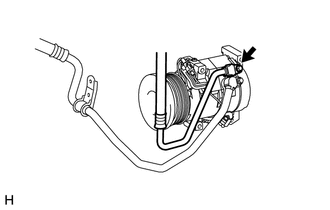
(b) Remove the O-ring from the discharge hose.
NOTICE:
Seal the openings of the disconnected parts using vinyl tape to prevent moisture and foreign matter from entering them.
4. DISCONNECT SUCTION HOSE SUB-ASSEMBLY
|
(a) Remove the 2 bolts and disconnect the suction hose from the cooler compressor. |
|
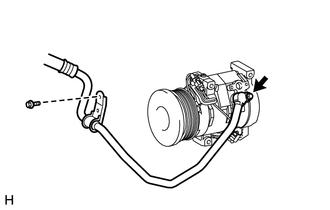
(b) Remove the O-ring from the suction hose.
NOTICE:
Seal the openings of the disconnected parts using vinyl tape to prevent moisture and foreign matter from entering them.
5. REMOVE COOLER COMPRESSOR ASSEMBLY
|
(a) Disconnect the connector. |
|
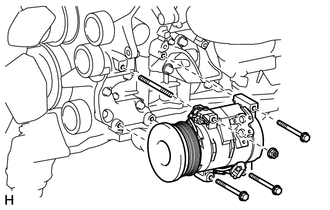
(b) Remove the 3 bolts and nut.
(c) Remove the stud bolt and cooler compressor.
 Inspection
INSPECTION
PROCEDURE
1. INSPECT MAGNET CLUTCH ASSEMBLY
(a) Check the magnet clutch operation.
(1) Confirm that the magnet clutch hub and magnet clutch rotor lock when the
positive (+) lead of ...
 Installation
INSTALLATION
PROCEDURE
1. ADJUST COMPRESSOR OIL
(a) When replacing the compressor and magnetic clutch with a new one, gradually
discharge the refrigerant gas from the service valve and drain the ...
Other materials about Toyota 4Runner:
Lost Communication with ECM (U0100,U0142,U0155)
DESCRIPTION
The air conditioning amplifier communicates with the ECM, main body ECU (multiplex
network body ECU) and combination meter through the CAN communication system.
DTC Code
DTC Detection Condition
Trouble Area
...
Customize Parameters
CUSTOMIZE PARAMETERS
1. CUSTOMIZING FUNCTION WITH TECHSTREAM
NOTICE:
When the customer requests a change in a function, first make sure that
the function can be customized.
Be sure to make a note of the current settings before customizing.
...

0.0131