
Toyota 4Runner: Removal
REMOVAL
CAUTION / NOTICE / HINT
CAUTION:
Wear protective gloves. Sharp areas on the parts may injure your hands.
PROCEDURE
1. REMOVE REAR SEAT HEADREST ASSEMBLY
(a) Remove the headrest.
2. REMOVE REAR SEAT TRACK INNER BRACKET COVER
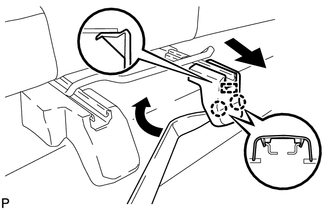
(a) Using a moulding remover, detach the 2 claws and guide, and then remove the cover.
3. REMOVE REAR SEAT TRACK OUTER BRACKET COVER
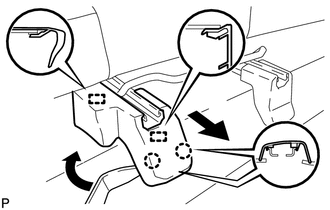
(a) Using a moulding remover, detach the 2 claws.
(b) Move the cover in the direction of the arrow to detach the 2 guides and remove the cover.
4. REMOVE SEAT TRACK INNER BRACKET COVER RH
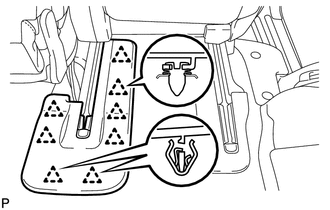
(a) Using a clip remover, detach the 8 clips and remove the cover.
5. REMOVE REAR SEAT TRACK COVER RH
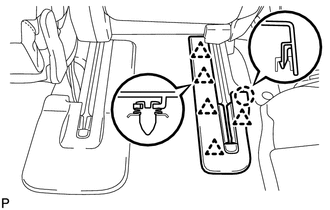
(a) Using a clip remover, detach the 5 clips and claw, and then remove the cover.
6. REMOVE REAR SEAT ASSEMBLY RH
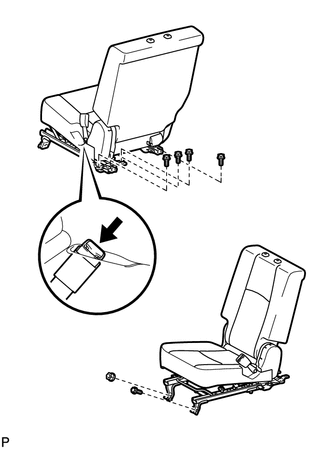
(a) Disconnect the center inner seat belt from the seat.
(b) Remove the 5 bolts and nut.
(c) Remove the rear seat.
NOTICE:
Be careful not to damage the vehicle body.
HINT:
Be sure to remove the seat with the seatback folded down.
 Components
COMPONENTS
ILLUSTRATION
ILLUSTRATION
ILLUSTRATION
ILLUSTRATION
ILLUSTRATION
...
 Reassembly
REASSEMBLY
CAUTION / NOTICE / HINT
CAUTION:
Wear protective gloves. Sharp areas on the parts may injure your hands.
HINT:
A bolt without a torque specification is shown in the standard bolt chart ...
Other materials about Toyota 4Runner:
Precaution
PRECAUTION
CAUTION:
Replace any faulty parts of the seat belt systems (outer belt, inner belt, bolts,
nuts, adjustable shoulder anchor, tether anchor hardware and other related parts).
When inspecting a vehicle that was in a collision, be sure to check a ...
Installation
INSTALLATION
PROCEDURE
1. INSTALL TORQUE CONVERTER CLUTCH ASSEMBLY
(a) Using a vernier caliper and straightedge, measure dimension "A" between the
transmission fitting surface of the engine*1 and the torque converter clutch fitting
surface o ...

0.0081