
Toyota 4Runner: Installation
INSTALLATION
PROCEDURE
1. INSTALL REAR WIPER MOTOR AND BRACKET ASSEMBLY
|
(a) Attach the 2 guides and temporally install the rear wiper motor and bracket assembly with the 3 bolts. |
|
.png)
(b) Tighten the 3 bolts.
Torque:
5.5 N·m {56 kgf·cm, 49 in·lbf}
(c) Connect the connector.
2. INSTALL REAR WIPER ARM AND BLADE ASSEMBLY
|
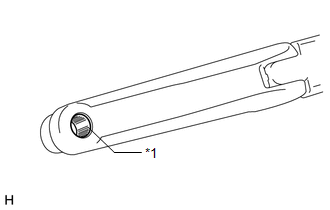
(a) Clean the wiper arm serrations. Text in Illustration
|
|
|
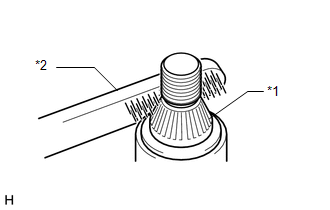
(b) Clean the wiper pivot serrations with a wire brush. Text in Illustration
|
|
(c) Operate the rear wiper and stop the rear wiper motor at the automatic stop position.
HINT:
The wiper motor does not operate if the back door and back door glass are not closed.
|
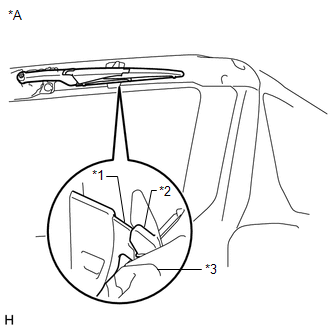
(d) With the rear wiper blade and linear wiper step in the positions shown in the illustration, install the rear wiper blade assembly with the nut. Torque: 5.5 N·m {56 kgf·cm, 49 in·lbf} Text in Illustration
HINT: Hold the arm hinge down by hand while tightening the nut. |
|
|
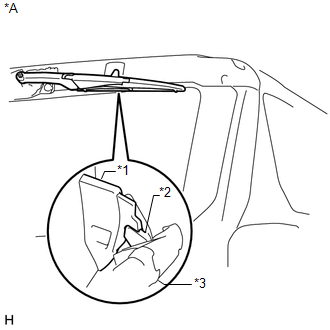
(e) Place the rear wiper blade assembly in the automatic stop position. Text in Illustration
|
|
3. INSTALL REAR SPOILER SUB-ASSEMBLY
.gif)
4. INSTALL REAR NO. 1 SPOILER COVER
5. CONNECT CABLE TO NEGATIVE BATTERY TERMINAL
NOTICE:
When disconnecting the cable, some systems need to be initialized after the cable
is reconnected (See page ).
 Inspection
INSPECTION
PROCEDURE
1. INSPECT REAR WIPER MOTOR AND BRACKET ASSEMBLY
(a) Check the wiper intermittent operation.
(1) Connect the positive (+) lead of the battery to terminal 5 (L) an ...
 Rear Wiper Rubber
Components
COMPONENTS
ILLUSTRATION
Replacement
REPLACEMENT
PROCEDURE
1. REMOVE REAR WIPER BLADE
(a) Apply protective tape to the areas shown in the illustration.
Text in Ill ...
Other materials about Toyota 4Runner:
Diagnostic Trouble Code Chart
DIAGNOSTIC TROUBLE CODE CHART
HINT:
If a DTC is output during the DTC check, check the parts listed in the
table below and proceed to the "See page" given.
*1: "Comes on" means the Malfunction Indicator Lamp (MIL) illumina ...
How To Proceed With Troubleshooting
CAUTION / NOTICE / HINT
HINT:
Use these procedures to troubleshoot the sliding roof system.
*: Use the Techstream.
PROCEDURE
1.
VEHICLE BROUGHT TO WORKSHOP
NEXT
...

0.0159