
Toyota 4Runner: Removal
REMOVAL
PROCEDURE
1. DISCONNECT CABLE FROM NEGATIVE BATTERY TERMINAL
NOTICE:
When disconnecting the cable, some systems need to be initialized after the cable
is reconnected (See page .gif) ).
).
2. REMOVE REAR NO. 1 SPOILER COVER
3. REMOVE REAR SPOILER SUB-ASSEMBLY
4. REMOVE REAR WIPER ARM AND BLADE ASSEMBLY
|
(a) Remove the nut and rear wiper blade assembly. |
|
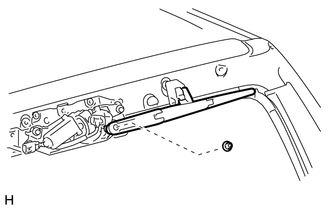
5. REMOVE REAR WIPER MOTOR AND BRACKET ASSEMBLY
|
(a) Disconnect the connector. |
|
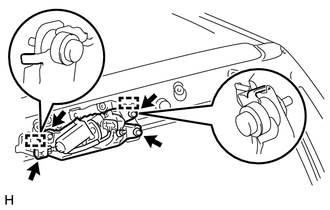
(b) Loosen the 3 bolts.
NOTICE:
Do not try to remove the bolts since they are integrated with the motor.
(c) Detach the 2 guides and remove the rear wiper motor
 On-vehicle Inspection
ON-VEHICLE INSPECTION
PROCEDURE
1. INSPECT REAR WIPER MOTOR AND BRACKET ASSEMBLY
(a) Operate the rear wiper motor and bracket assembly.
(b) Stop the rear wiper motor and bracket assembly operation ...
 Inspection
INSPECTION
PROCEDURE
1. INSPECT REAR WIPER MOTOR AND BRACKET ASSEMBLY
(a) Check the wiper intermittent operation.
(1) Connect the positive (+) lead of the battery to terminal 5 (L) an ...
Other materials about Toyota 4Runner:
Inspection
INSPECTION
PROCEDURE
1. INSPECT PROPELLER SHAFT ASSEMBLY
(a) Using a dial indicator, check the propeller shaft runout.
Maximum runout:
0.4 mm (0.0157 in.)
If the shaft runout is more than the maximum, replace the shaft.
...
Door Control Transmitter(w/ Smart Key System)
Components
COMPONENTS
ILLUSTRATION
Removal
REMOVAL
CAUTION / NOTICE / HINT
NOTICE:
Take extra care when handling these precision electronic components.
PROCEDURE
1. REMOVE TRANSMITTER BATTERY
(a) Push the release hook knob and extrac ...

0.0114